
Any fix in this weird import in Substance painter?

Forum Archive Any fix in this weird import in Substance painter?

Viewing 2 posts - 1 through 2 (of 2 total)
  • Author
    Posts
  • #7722
    Rolando Morales Jr
    Participant

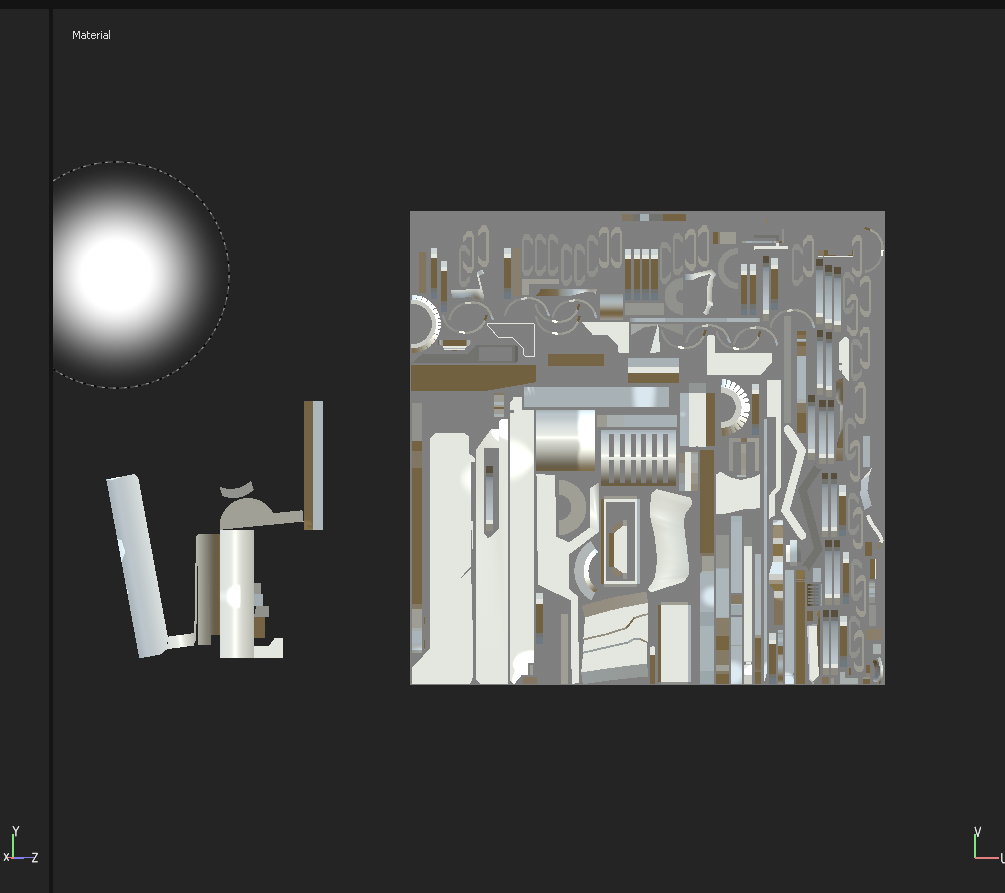
      After doing doing the modelling work, I then exported it to .fbx then send it to Substance Painter. The result in the image plane is this. 

      What’s with the random stuff beside it.?I checked my UV’s in Blender, everything seems to fall into the right places.

      Update* :  Tried exporting it to .obj. It worked but hopefully I’ll know a solution for using an .fbx file.

      #27556
      Jonathan Lampel
      Participant

        Strange! Haven’t seen that one before, but double check your UV maps in the object data properties and delete any secondary maps that you may have left over – sometimes they get exported instead of the one you see in the render. 

      Viewing 2 posts - 1 through 2 (of 2 total)
      • The topic ‘Any fix in this weird import in Substance painter?’ is closed to new replies.