
anomaly – how to get rid of

Forum Archive anomaly – how to get rid of

Viewing 5 posts - 1 through 5 (of 5 total)
  • Author
    Posts
  • #21411
    Martijn Somhorst
    Participant

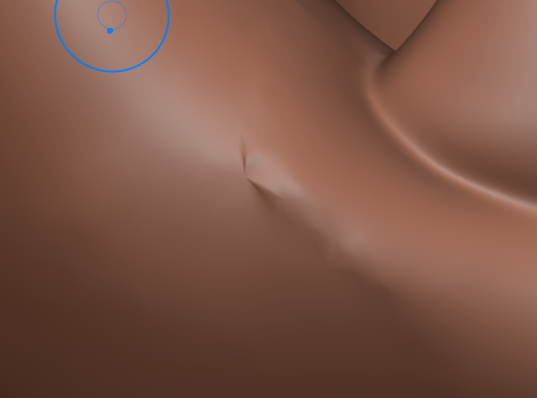
      I get these ‘anomalies’, what is the easiest/best way to get rid of it, to clean this up so to speak?

      #99761
      Martin Bergwerf
      Participant

        HI Martijn,

        Try Fill and Smooth. Maybe also use Inflate a bit. Or try the Clay Brush, together with Smooth.

        Sometimes these bits can be really stubborn and come back, as soon as you try to Smooth. In that case, you can also go into Edit Mode and Delete the obnoxious Vertex/Vertices and then just Fill the hole and switch back to Sculpt Mode. This is, if you use Dynamic Topology. This method won’t work if you use Multires Sculpting.

        #99762
        Omar Domenech
        Participant

          There’s also the nuclear option. You can go into edit mode and delete and grid fill those faces. And then smooth over it as usual so it triangulates and becomes part of the horrible sculpted mesh and feel right at home. 

          #99763
          Grady Pruitt
          Participant

            Are you sculpting or mesh modeling? If you’re sculpting. like they said sometimes you might have to go into edit mode. Sometimes,  if a face gets too thin, odd behavior can happen. If you’re mesh modeling, you can also double check for extra verts as well as interior edges and faces that might have been accidentally created and shouldn’t be there. Can’t tell you how many times I was filling holes and accidentally grabbed a vert from the wrong side only to notice odd behavior in the mesh that I missed when filling the hole 😀

            #99764
            Martijn Somhorst
            Participant

              tnx seems to be solve. deleted a mesh point, filled it (both in edit mode) and then some fill and smooth actions

            Viewing 5 posts - 1 through 5 (of 5 total)
            • The topic ‘anomaly – how to get rid of’ is closed to new replies.