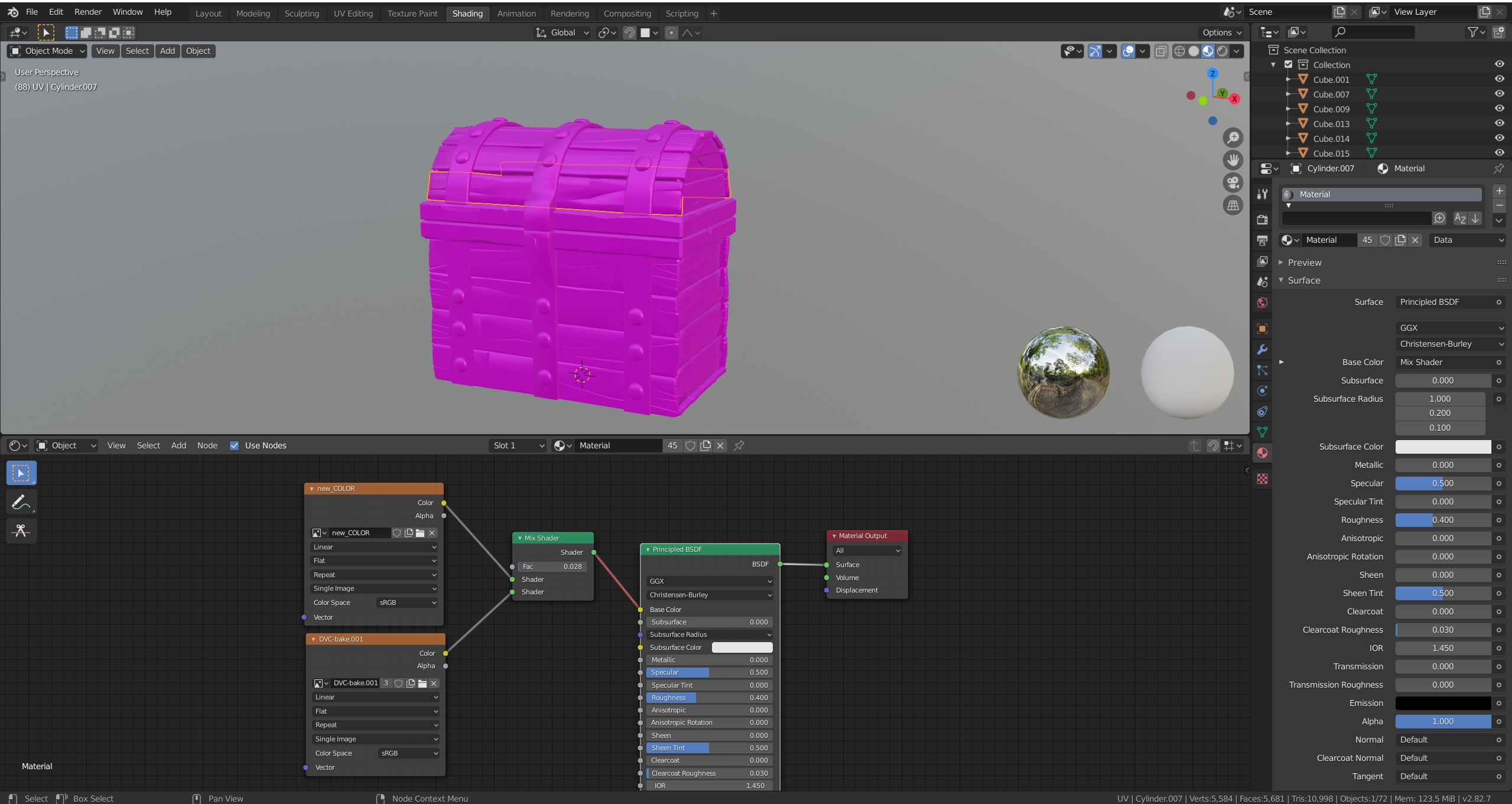
Hey Andrey, You would want to use a Color > MixRGB Node in this case.
A Mix Shader only mixes Shaders! Shaders are green and have a green output (often a BSDF).
Image Texture Nodes have a yellow output (Color, and also an Alpha) that contains three values: for red, green and blue. That usually connects to a yellow input socket, like the Base Color of a Principled BSDF, or of a MixRGB.
It’s a bit confusing and it took me years, before I understood when to use a Mix Shader and when a MixRGB.
Grey sockets represent 1 value (like black and white), yellow and purple sockets have three values (color, normals, or XYZ coordinates), but the green sockets are something completely different and cannot be connected with any other color socket.
Now, there appears to be an exception in modern versions of Blender, where you can connect any output to the green input of a Output Node, but this is just because Blender, internally makes that connection through an Emission Node.
When you connect a grey output to a yellow or purple input, then that one value is being put into all three values of the color input.
I hope this is helpful and not ‘more confusing than insightful’.

.