
Align tool in Blender (AKA Copy transforms) – similar to 3dsmax Align tool?
Forum Archive › Align tool in Blender (AKA Copy transforms) – similar to 3dsmax Align tool?
- This topic has 5 replies, 3 voices, and was last updated 1 year, 9 months ago by
Markus Schille.
-
AuthorPosts
-
November 29, 2024 at 6:16 am #19249
Hi,
Coming from 3dsmax, Blender seems to be doing a few things very differently. I’m learning about armatures and rigging, and I was curious to find out how to easily align two bones on top of each other in Pose mode. For example if you want to manually place an IK hand on top of an FK hand with the same position and orientation (assuming the rig doesn’t have built in IK/FK matching).
After googling quite a bit (it’s difficult to find the right search term when you speak a different lingo), I found an addon called “Copy Attributes Menu”
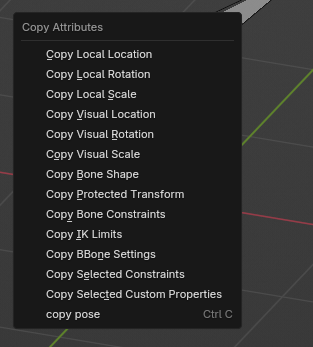
This addon gives you a menu when you press CTRL-C that lets you copy location, rotation etc. This menu works both for aligning Bones in pose mode, and for objects in object mode.
Coming from 3dsMax I’m used to having an essential “Align tool” in the main shelf. This tool lets you align objects position, rotation and scale in X,Y,Z separately based on Pivots, Centers, Min or Max. In 3dsmax Bones are individual separate objects (for better or for worse), so this also works within rigs as well.
What is the typical workflow people use in Blender? I also noticed there is an Snap with orientation option in the snap menu, but there is no Snap to Pivot/origins option that I could see, or am I missing something?
November 29, 2024 at 11:35 am #91444“…how to easily align two bones on top of each other in Pose mode…”
Now, I am not a Rigger and I don’t know 3ds Max, but couldn’t you just use a Copy Transforms Bone Constraint and change between an Influence of 0 (original LocRotScale) and an Influence of 1 (LocRotScale of Target Bone) for that?
As for the rest of the question, I don’t understand what you want to do exactly, sorry.
November 30, 2024 at 6:16 am #91445What I was looking for was what methods Blender users would use to copy transforms on the fly for example while posing, but without adding new constraints to a rig.
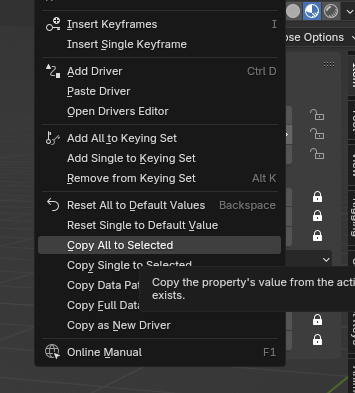
I’ve learned that you can simply copy transforms from the Transform panel (limited, but useful in some cases).
I also learned about the Copy Attributes addon. This lets you copy the visual transforms (world space I guess?).
 November 30, 2024 at 10:36 am #91446
I’m not sure exactly what you are looking for, but If it’s aligning bones you can use snapping(Shift+Tab) and set it to vertex(Ctrl+Shift+Tab). If you want it to align it’s rotation as well, then you need to check align rotation to target(CTRL+Shift+Tab). You can also snap 3D cursor to places(Shift+S) then snap selected bones to the 3D cursor(Shift+S). You can also select multiple bones. Then snap to active bone[The last one selected with brighter outline](Shift+S->Selection to Active). This doesn’t rotate them to match, but you can use the copy to selected option in the n-Panel.
As for the Visual, this is how it appears in reference to the world/global origin. For example: If it’s parented then it’s transforms are in reference to the parents origin(Head on a bone).
November 30, 2024 at 11:14 am #91447As an additional note: If you use the copy attribute addon you may want to change it’s hotkey. I change it to ctrl+c+drag. For most people I’d recommend changing it to alt+c. The reason I say this, is that copying and pasting poses is done a lot in my experience and having to go thru the menu is slower and kind of annoying. Maybe that’s just me. To change it quickly. Ctrl+comma or edit/F4->Preference. Then click keymap. Then click key-binding next to search box. In search box, type “ctrl c” without the quotes. Scroll down until you see pose. Then under that you will see the 2 Ctrl+c options. The Copy Attribute is the one you want.
-For Alt+C there are 2 ways to change it. Once it’s changed it will disappear since it no longer matches the search.
- Click where it says Ctrl+C. Then press Alt+C.
- Expand it then click the alt button first. Then click the ctrl button.
-For Ctrl+C+Drag: How this works: when you press Ctrl+C it copies the pose. When you hold down ctrl+c and move your mouse you get the Copy attribute menu. Once the menu pops up you can let go of the ctrl+c.- Expand Copy Attribute
- Click where it says press and on the drop down select Click Drag.
- Scroll down to 3D View and expand Copy Object.
- Change Press to Click.
November 30, 2024 at 3:46 pm #91448Excellent information! Thank you Dwayne!! 😍
-
AuthorPosts


- The topic ‘Align tool in Blender (AKA Copy transforms) – similar to 3dsmax Align tool?’ is closed to new replies.