Add new vertex to existing edge

Forum Archive Add new vertex to existing edge

Viewing 6 posts - 1 through 6 (of 6 total)
  • Author
    Posts
  • #15747
    Roxana Moise-Dan
    Participant

      Hi,
      How can one add a vertex (with CTRL+ RIGHT CLICK) that sits exactly on an already existing edge? Everytime I try to add one and then, let’s say, I try to move it, it does not affect the edge on which I thought I created it. So basically it’s just a vertex sitting in space, with no connection with the edge and I need to place it exactly on that edge (as would subdivide do, for example).
      #76790
      Martin Bergwerf
      Participant

        Hi Roxana,

         What I usually do,  is selecting the Edge and then Subdivide it.

        #76791
        Martin Bergwerf
        Participant

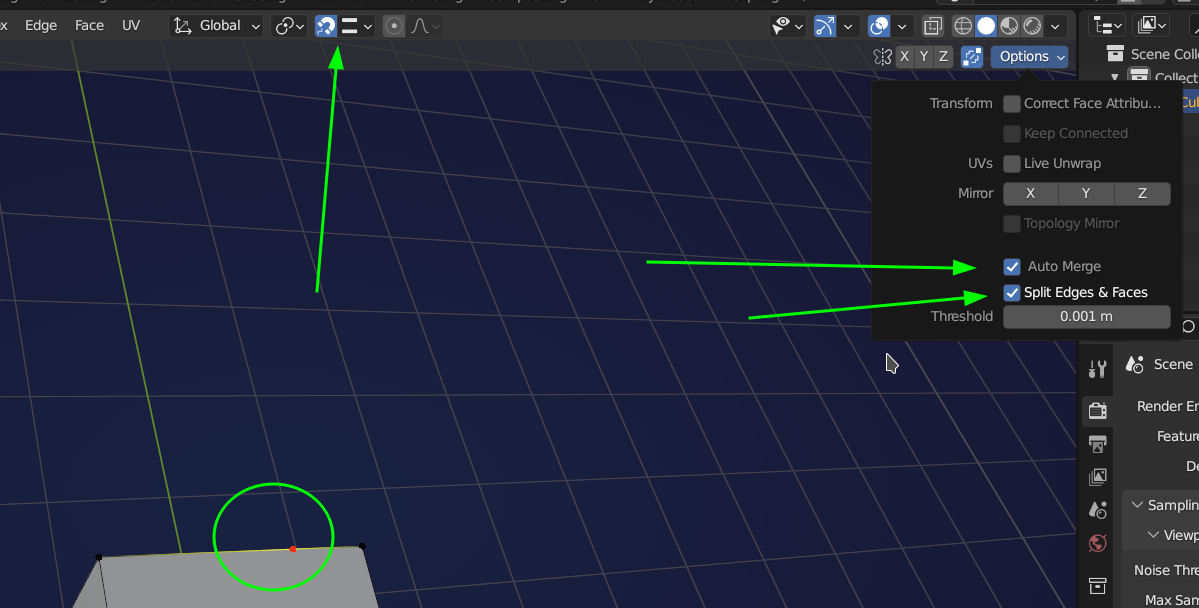
          But, with your method, you most likely won’t hit the Edge exactly, so you’d have to Snap the new Vertex to the Edge and also have Auto Merge and Split Edges and Faces enabled:

          2022-12-14_19-33.png

          #76792
          Omar Domenech
          Participant

            Yes it’s better if you subdivide. If you want to try the control plus click, if you don’t want to have a vertex floating by it’s own, you can select a vertex and then with the vertex select do the control click and the vertex you add will be connected by an edge, so it’s basically an extrusion. 

            #76793
            Omar Domenech
            Participant

              First time I’ve seen split edges and faces. That works nice Mister Wizard. Just tried it right now. 

              #76794
              Roxana Moise-Dan
              Participant

                Thank you for helping me! 

              Viewing 6 posts - 1 through 6 (of 6 total)
              • The topic ‘Add new vertex to existing edge’ is closed to new replies.