
2:26 – if the mesh hasn’t been unwrapped why does it still show as if it might have been
Forum Archive › 2:26 – if the mesh hasn’t been unwrapped why does it still show as if it might have been
- This topic has 15 replies, 4 voices, and was last updated 2 years, 9 months ago by
Dwayne Savage.
-
AuthorPosts
-
December 5, 2023 at 7:01 pm #17166
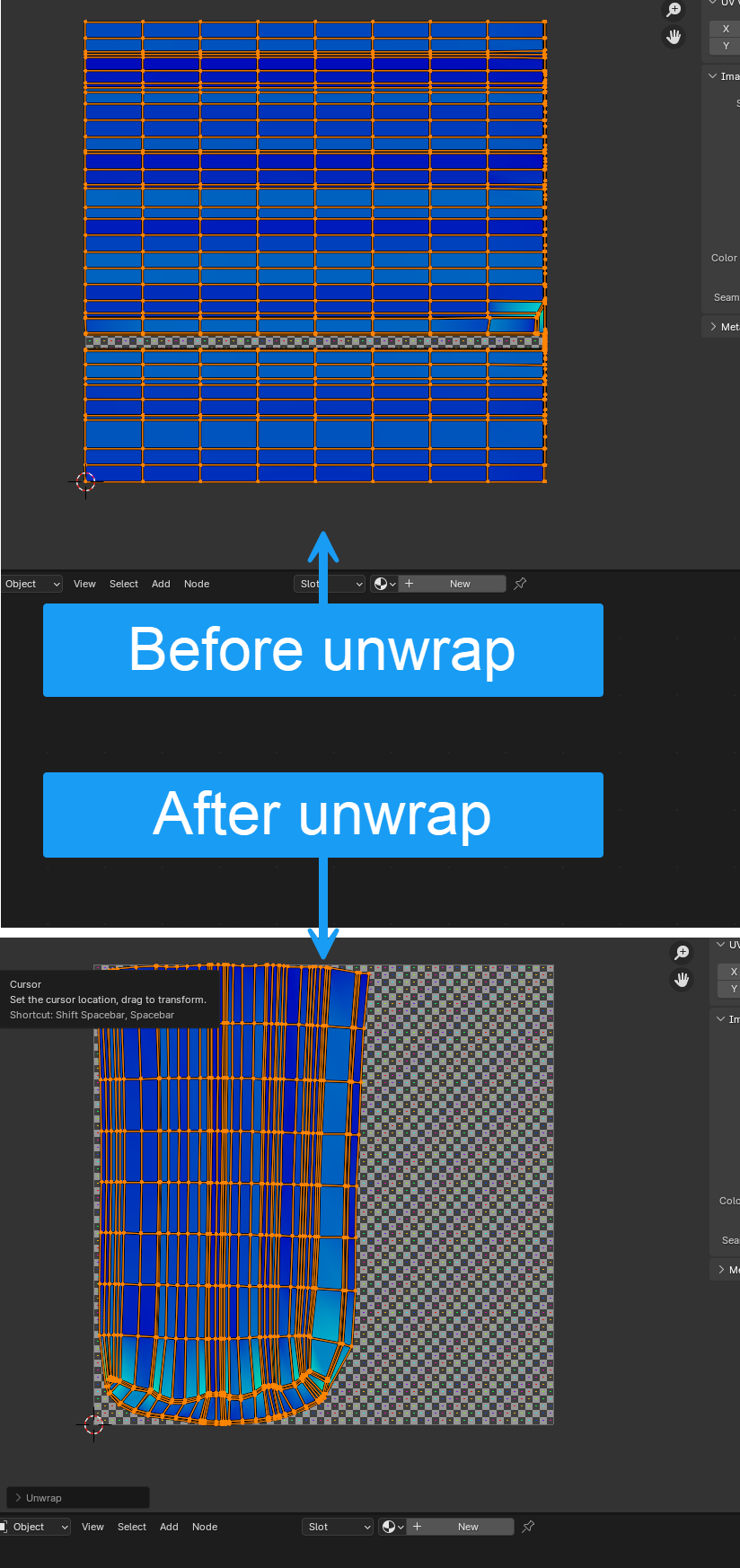
This caught me out as I saw it ‘unwrapped’ and wondered why it didn’t look like JL’s. Followed along and marked the seams etc. only to double back and start again when it was clearly wrong… then saw that JL does an initial Select All Unwrap.
Still finding the implementation of UV’s in Blender incredibly perplexing from a UX perspective
 December 6, 2023 at 7:25 am #82554
Primitive Objects come unwrapped by default, you build up upon it and make a mess out of the original UV’s. All the while you are modeling and changing your mesh and then you unwrap and get the shape in the UV’s your mesh now has.
UV’s are fairly simple. It’s just as a cornflakes box when you open it up to throw it in the trash. You don’t want the 3D version of the box in the trash, it takes too much space, so you rip the box by the seams to make it flat and 2D. In Blender you are trying to intuitively think where the seams should be, because there are no seams. In the cornflakes box it comes with the seams already, in Blender you have to decide where a cut should be for an object to be lay flat if ripped like the cornflakes box.
December 6, 2023 at 9:22 am #82555Does that mean that most object have UVs by default, even after they’ve been transformed a lot, as most objects are built from primitive shapes?
December 6, 2023 at 9:59 am #82556I’d say so yeah. Martin or Adrian can either confirm or deny. Anything they say will be held against them. They have the right to a Blender attorney.
December 6, 2023 at 10:16 am #82557Yes blender has default UV Maps for all primitives. Also blender auto updates the UV Map as you edit the mesh. If you want no UV Maps at all then you need to goto properties editor->mesh tab->UV Maps panel and delete it/them if you’ve added additional. Side note: shader editor uses active UV Map by default. If there isn’t one then blender uses the generated coordinates.
December 6, 2023 at 10:17 am #82558Confirmed!
All Primitives come with a default UV Map. There is a checkbox in the Last Operation Panel:
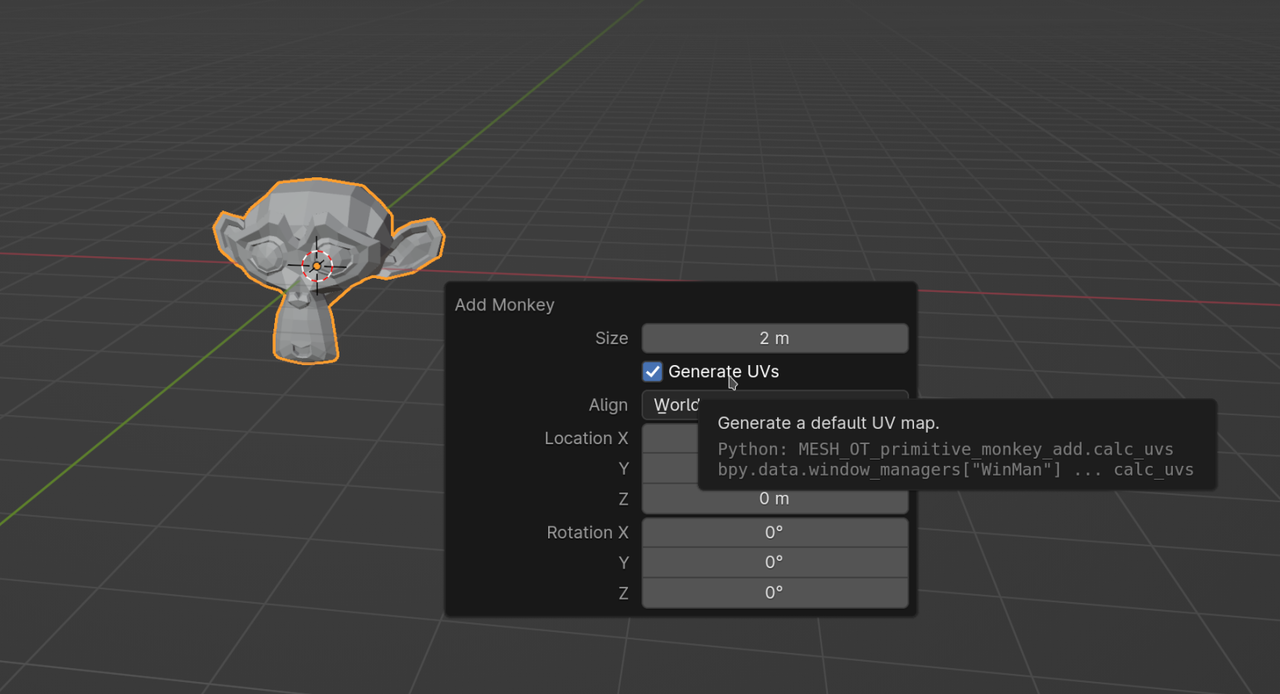
I don’t think (but I might be wrong) that you can disable this permanently, though.
December 6, 2023 at 10:34 am #82559OK thanks. I knew primitives came with default UVs but didn’t realise these persisted and evolved as you edited and added new faces to the mesh. A more logical implementation (IMO) would be to clear default UVs once you’d edited the mesh. So therefore I’d assumed that the pothead would have zero UVs and that’s why we needed to ‘create’ them. A more appropriate terms would be ‘updating’ the UVs. I guess this is just one of those things you need to know but I do at least know it now.
December 6, 2023 at 10:52 am #82560@thehomme a little history to help you understand the teachers here. Before 2.80(it may be 2.83) Blender didn’t create UV Maps by default and shader editor defaulted to generate. They’ve been teaching Blender since before 2.70 and have gotten use to explaining things in a certain way. Also before 4.0, blenders default UV Maps are usually pretty bad. We’ll see if the new 4.0 algorithm does a better job.
December 6, 2023 at 12:22 pm #82561Clearing a UV Map as soon as you start Editing the Mesh sounds like a really bad idea to me. Only clearing the default UV Map when starting to Edit, but not the others, would be rather inconsistent.
I wonder, is ‘logical’ a subjective term, or just relative…?
December 6, 2023 at 1:53 pm #82562Clearly I have a narrow view based on a very limited amount of knowledge, but I really think the whole UI/UX of the UV system could be a whole lot easier to understand. The advantage I do have is that I see it as is without previous knowledge and history which possibly enables me to see the problems more clearly.
The analogy I’ll make is Photoshop creating an alpha channel by default based on some arbitrary ruleset and evolving that alpha channel as you work on your composite. You either need UV’s or you don’t so why not leave it to the user to explicitly decide to unwrap the object.
December 6, 2023 at 4:16 pm #82563Poor UV’s, they’re not doing anything wrong existing by default. If you’re not going to use them, there’s no harm them being there if you’re not even going to go into the UV editor. I guess it’s like renting an apartment and there’s a big flat screen TV on the wall there by default. I might say I don’t watch TV, I don’t need one and so the part of the wall with the TV flip’s around and hides it. Your wall is free to hang a painting and the TV wont bother you ever again. But it’s there if you need it, something might happen, maybe the internet goes down and now we have to go to the good old days of cable TV.
December 6, 2023 at 7:15 pm #82564Using your analogy, If you have a PNG that has an alpha channel it defaults to total white(full opacity). You can delete the alpha so that the PNG has no alpha channel. You can leave the alpha channel just as it is, but sometime you need to make adjustments to the alpha channel. just like how an alpha channel has to have a value for every pixel of the image, UV Maps must have every vertex, edge, face, vertex normal, split normal(Also known as edge normal), and face normal accounted for in it’s mapping. If you take an image that doesn’t have an alpha channel and then add an alpha channel to it in Photoshop you will get asked do you want to default to full opacity(White) or full alpha(Black) or at least it use too. I haven’t used Photoshop since version 7.0 on windows 98. Gimp just defaults to full opacity. If you add another UV Map or delete the UV Map and add one a default UV Map will be created because you CAN NOT have a blank UV map. Again ALL vertices, edges, faces, vertex normals, split normals, and face normals have to be mapped.
December 7, 2023 at 3:27 am #82565Hey Dwayne @dillenbata3 ,
As far as I know, a UV Map, maps each Face Corner to a point on the 2 dimensional UV plane. When you start With a Circle, there are no Faces and therefor no Face Corner. There is however a UV Map created. This is what you might call an Empty UV Map. (Usually Meshes are 2 dimensional, but a circle is 1 dimensional, which gives it an exceptional position.)
Interesting fact: once you start Extruding (the Circle) and thus making Faces, all new Face Corners will be mapped to (0, 0).
December 7, 2023 at 10:06 am #82566The info is still in the UV Map’s texture space. Usually as a single point. The UV editor only shows texels to pixel mapping for faces since vertices and edges aren’t rendered in most render engines. Face corners can be moved to a single point thus creating a single texels for an entire face. This is a common atlas work flow.
***Edited*** this is my understanding of UV Maps. I could be wrong.
December 7, 2023 at 10:10 am #82567I got lost about 3 messages ago. Just had to google ‘texel’ 🙂
-
AuthorPosts


- The topic ‘2:26 – if the mesh hasn’t been unwrapped why does it still show as if it might have been’ is closed to new replies.