2:11 Setting the proprties – how did you get there on the menu?

Forum Archive 2:11 Setting the proprties – how did you get there on the menu?

Viewing 3 posts - 1 through 3 (of 3 total)
  • Author
    Posts
  • #16443
    erikitect
    Participant

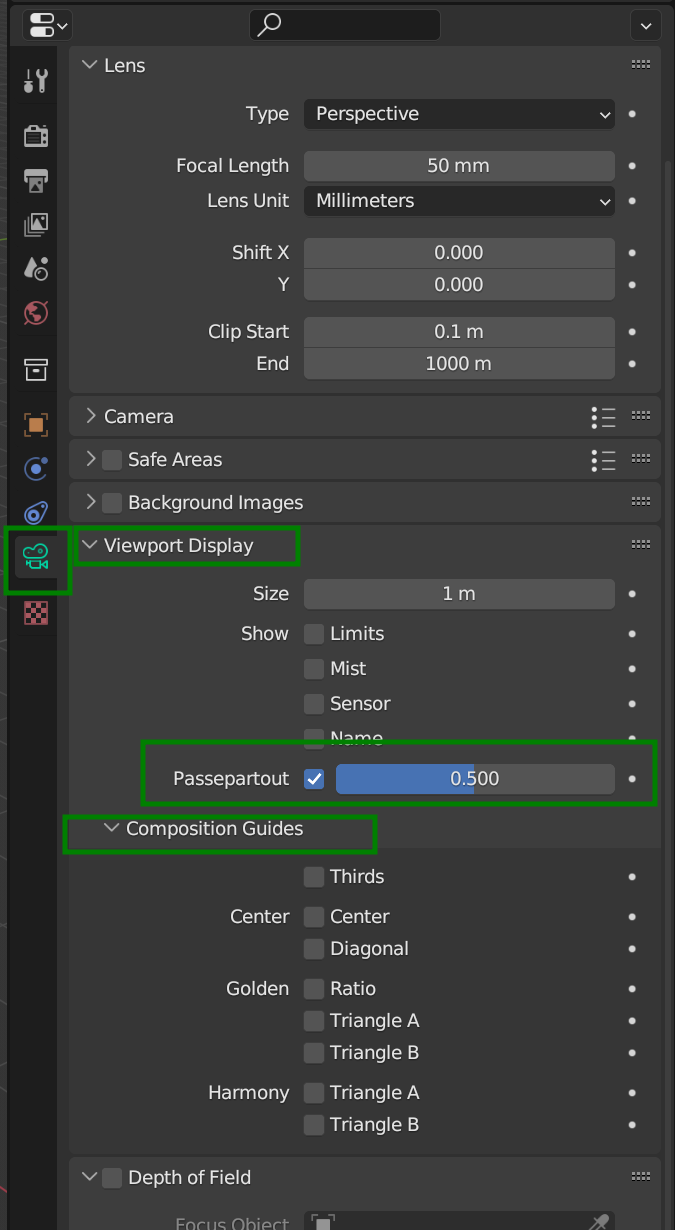
      At about 2:11 where you adjust the Passepartout and show composition guides– how do you find that on the menu– I couldn’t.

      #79511
      Martin Bergwerf
      Participant

        Hi Erik,

        Make sure you have the Camera selected and then go to the Camera Properties:

        Passepartout.png

        #79512
        Omar Domenech
        Participant

          One handy tip, there is an addon called Add Camera Rigs that you can find if you go to Edit then Preferences and in the Addons tab search for that name. It’ll let you add camera with much more controls and it has all the relevant options in the N panel, which is so much easier to reach. It’s been ages since I go into the convoluted camera settings in Properties Panel. 

        Viewing 3 posts - 1 through 3 (of 3 total)
        • The topic ‘2:11 Setting the proprties – how did you get there on the menu?’ is closed to new replies.