
Reply To: “Why did we add the MCH bones?”
Forum Archive › “Why did we add the MCH bones?” › Reply To: “Why did we add the MCH bones?”

Excellent work Tillsie.
There’s so many things to love about this.
– you had a question (awesome)
– you dug into to learning the answer on your own, using the knowledge you are acquiring (more awesome)
– showing others your thinking (insert Vincent McMahon meme here….if I knew how to do that)
I do want to elaborate on a few points.
– One of the key points in showing this method is that it works in every situation and any orientation for the CTRL bones.
Sometimes you can’t have them world aligned. No worries, it still works.
This is less to think about when you are learning something super complicated like rigging. (Cognitive Load Theory)
– The `Relative` option is mathematically buggy so you will get unexpected results which makes it unusable…..mmmm maybe I can either fix it for Blender 6.0 or remove it.
– The Automatic option mentioned above requires a slightly different set up to work. (this follows my first point above)
Automatic will use the bones that is it connected to as a parent/child.
This means the bottom MCH needs to be positioned differently – and the top MCH needs to be a connected child
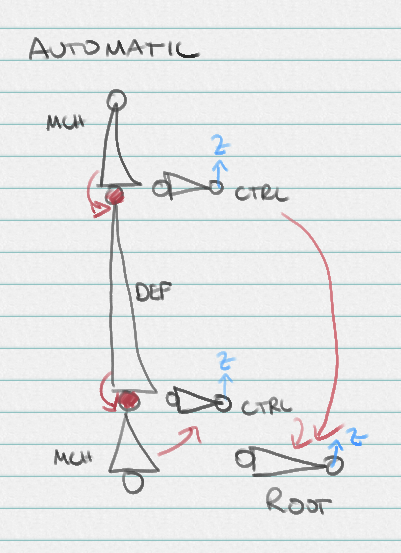
It is also possible to use the controls for this method, but as you have learned it does 2 things.
-The controls NEED to be aligned with the DEF bone (not always possible)
-The pivot point of the bottom control isn’t going to be at the start of the mesh, it’s going to be at the head of the CTRL bone. (this is not ideal)
Hope these ramblings make sense.
But I’m literally giving you a standing ovation for all the learning and sharing you have done.
And by literally, I mean ‘literally’….not the way these kids use that word to mean ‘figuratively’.
Bravo.