Well, you’d need a gradient between the cells, in stead of a ‘blur’, but that offers many problems, the most obvious being that the cells have different rotations of the Texture and when going smoothly from one rotation to an other, the Texture starts to ‘swirl’ on the cell borders like this:
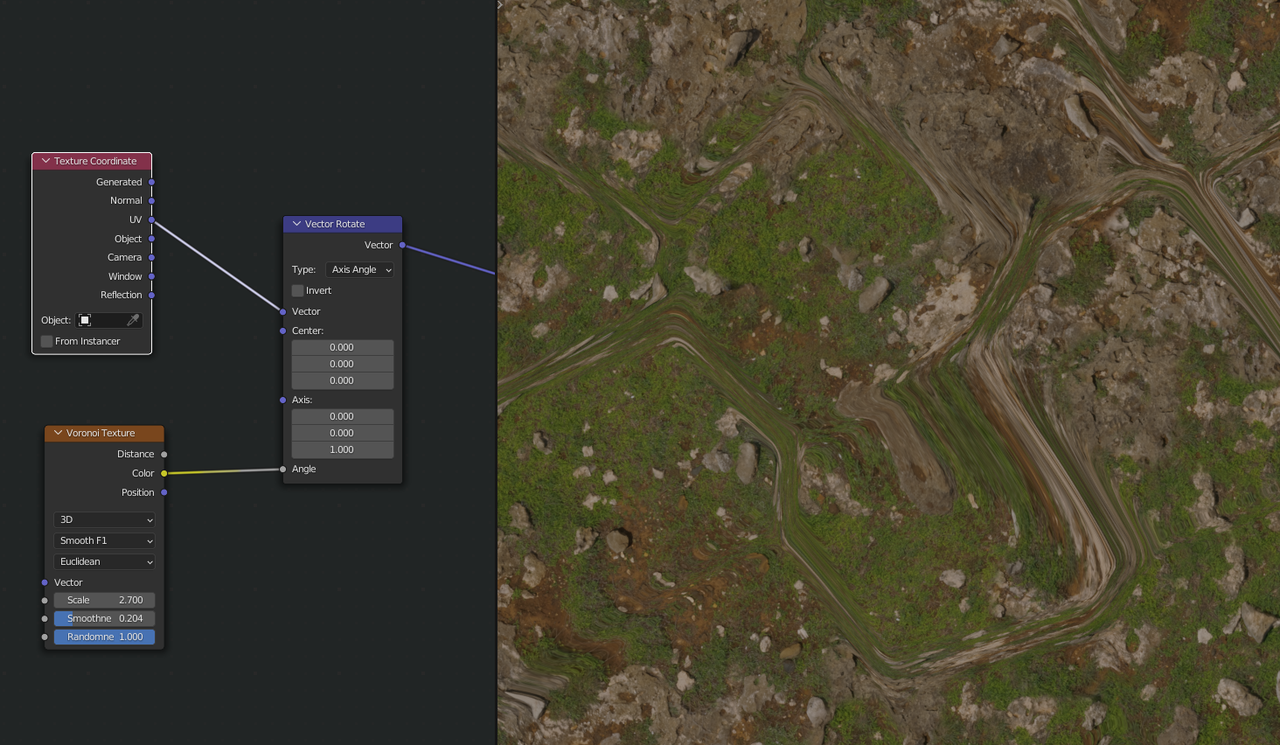
I don’t think there is a way around that, when using rotations to hide pattern repetitions.
The question is, do you really need it; the pattern repetition is only noticeable, when you look at it from far away, but then you wouldn’t need displacement and when you are close enough to need displacement, you wouldn’t need the Scattershot… (of course, when zooming in or out you’d need both, but not at the same time…).
What I would do, is to take two (or more) similar looking textures and mix between them (Color > MixRGB Node) with a Musgrave Texture as Factor, because that can have a smooth transition between black and white. (I know it produces values outside the 0 to 1 range, but the MixRGB Node automatically clamps its input.)

