Hey @patdoc Before you apply your rotation or scale or transform location, go into ‘object mode’ then open up the Sidebar by hitting the ‘N’ key on the keyboard. Go to the ‘ITEM’ tab and take a look at your object’s transform Location, Rotation, and Scale (or it is in the Object Data on the Properties section to the right).
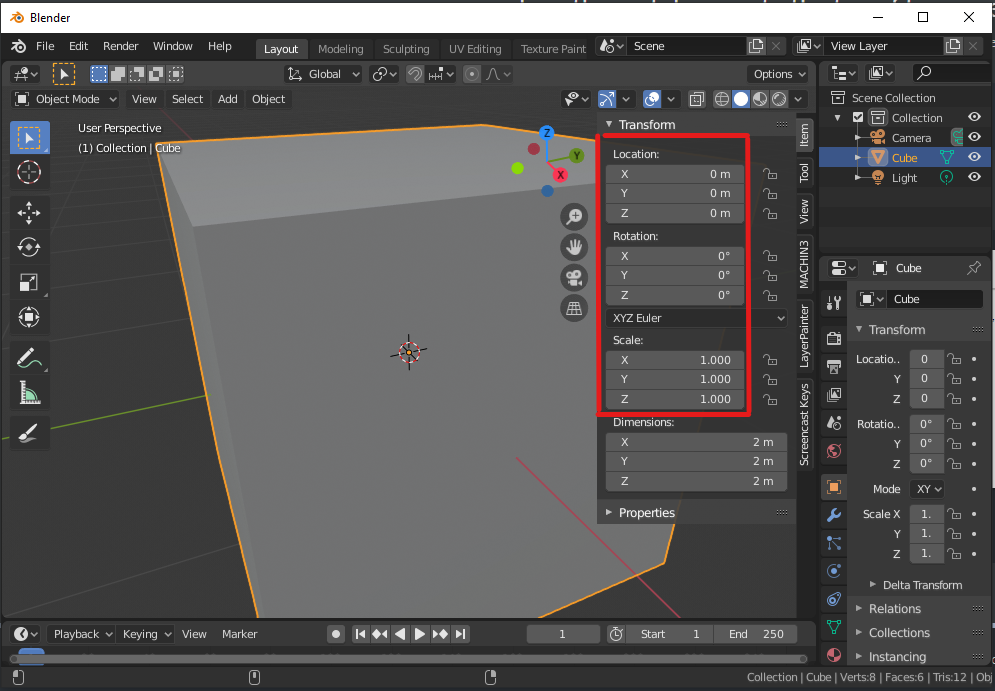
The scale should typically be 1 for X/Y/Z, and the location and rotation should typically be 0 for X/Y/Z.
If they are not and you have a modifier active but not applied (such as mirror modifier) then you will get such unexpected behavior.
You can apply the modifiers before applying the rotation and hopefully that should stop affecting your object.
Hopefully that helps. If not then post a screen shot showing the active modifiers and the SideBar panel ‘Item’ tab to show your object before and after the applied rotation. Perhaps we can see more of the issue.

