
Reply To: Export of Animated 3D Web Assets: Help Needed with GLB/GLTF Pipeline
Forum Archive › Export of Animated 3D Web Assets: Help Needed with GLB/GLTF Pipeline › Reply To: Export of Animated 3D Web Assets: Help Needed with GLB/GLTF Pipeline

I worked with ThreeJS a few months ago and faced similar problems.
If you go to Export in Blender and the new window appears, there are settings on the right.
You could try to select your object beforehand and then in the settings under “Inlcude” you only select selected objects. Then it will only export the selected objects and their animations.
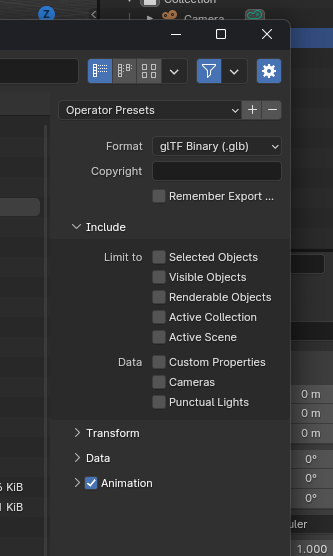
There is also a setting to export only the scene or only visible objects.
It is also important that the check mark for animations is set at the bottom. It’s best to play with the settings 😉
It also helped me to export the file as GLTF. It is then structured in JSON format and you can view the structure in Notepad to see exactly which objects and actions it has exported. That looks something like this

Then you can also address the actions directly with the respective name
Regarding your other question whether there are tutorials on assets. There are some videos about game assets about modeling and texturing here at CGCookie maybe they will help you already
https://cgcookie.com/playlists/1589-game-asset-creation.
But I would say that you control most of it on the web, i.e. how you load the objects, how many objects you load, how high-resolution the textures should be, etc.
I loaded the file back then and addressed the objects and animations directly. Otherwise, i don’t want to advertise but look for “ThreeJS Journey by Bruno Simons”, which covers a lot of things in relation to 3D on the web but costs 99$.