I’ve been lurking in this thread because I’m interested in 2.8. I haven’t quite decided if I want to fully commit to joining or not, but I’m considering it… though, I guess I’m a little late to the party. Regardless, I wanted to try to help a little:
@yukinoh1989 The “period key” is the key with the little dot on the number pad on your keyboard. Providing I can figure out how to embed an image, you can see it on my keyboard in the image below.
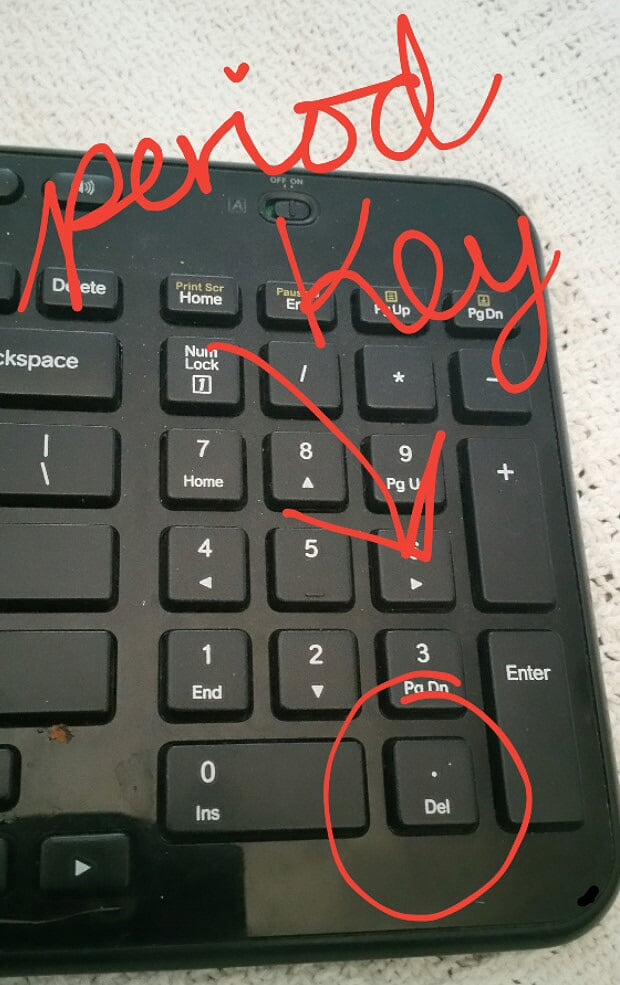
It’s helpful (at least in 2.79) for focusing your viewport on whatever object you have highlighted (and are thus working on). This is particularly helpful when you’ve managed to zoom too far out or pan too far over. Doesn’t help you, though, if you’ve managed to flip yourself upside-down. In that case, you’re better off hitting 1, 3, or 7 on your number pad to bring you to a front, side, or top view and then use the period to focus in from there. At least then you can start panning and orbiting and zooming all over again from a familiar orientation.
Not sure if that’s what you wanted to know, but that’s how I understood what you’re asking. 🙂

