
Reply To: add ui script
Forum Archive › add ui script › Reply To: add ui script

Hi T,
I love that you’re trying to connect all the things that you have learnt.
Let’s see if I can help you out.
It’s not clear exactly what the issue is – and there’s 2 things I think you might be experiencing.
Are you saying…
A. That when you send the file to someone and the ui script isn’t in the blend file?
Or
B. When you link/append the Wrangler into a new file, the ui script isn’t there?
——
A
——
The first thing I would try is what Omar has mentioned. If the script doesn’t have any users it might be saved with your file. So if you open it up again it will be gone.
Another thing to try is to see if you have actually loaded the file from disk and it isn’t actually in the file itself.
Check in the bottom on the text editor and see if it says Text Internal or External.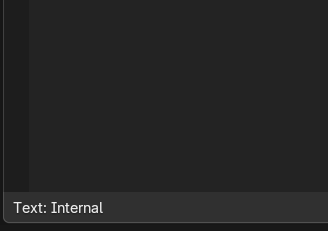
If it is external I think you can just click on it to make it internal, it will look like a life ring flotation device (you know the type of thing they throw to you from a boat when you fall overboard).
———
B
———
If you are appending the Wrangler and the UI isn’t coming along, you need to attach it to the rig with the data_block property.
First add a custom property
Type: Data-Block
ID Type: Text
Property Name: something logical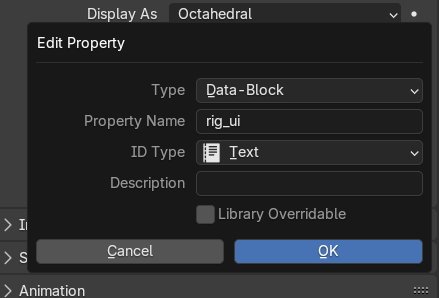
Then you will see that custom property on the armature data (where you create it)
Choose the ui script from the pop up.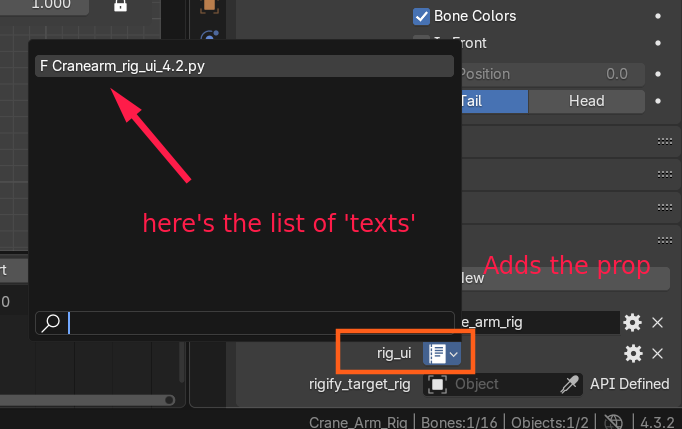
Then the script will always follow along with your rig into any file.
Let me know if that answered your question.