Hey Nathi.
Cute characters.
Let me see if I can answer all your questions.
Yes you can copy the rig to the other characters.
After you’re done with 1, you can duplicate it and transfer the weights from one mesh to the other. (more on that in a moment)
You could share the same data on the armatures but that will only really help you if you need to tweak the positions (then it will update on the copies)
Constraints live on the pose bones, but the data of the armature is related to edit mode. So if you change any constraints, it will only change that one the copy you are working on. So it’s best to finish your rig first.
As for transferring weights – there are 2 ways.
Transfer the weights in weight paint mode – select both meshes, then in weight paint mode go to the ‘weights’ menu and choose transfer weights.
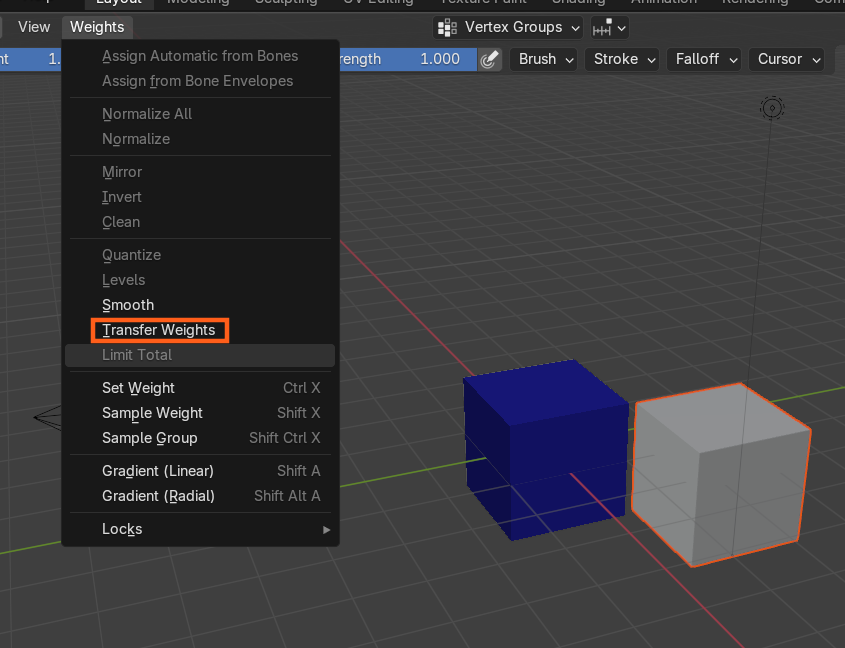
I can’t remember the correct order you need to select them but I think the tool tip will tell you.
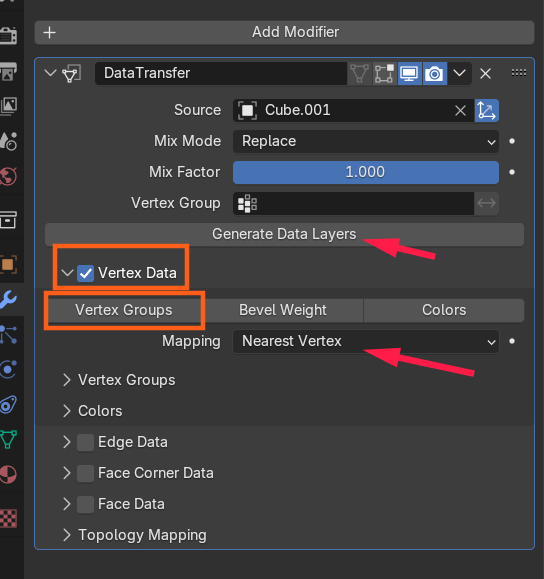
The other way is with the data transfer modifier.
Set the Vertex Data on, as well as Vertex groups, and then you can change how it is mapped.
The generate Data Layers button will create the vertex groups it needs on the mesh, But once the settings are looking correct, you can apply this one.