
Reply To: I have question, why is my Edit mode rig setup is diffrent than pose mode rig look?
Forum Archive › I have question, why is my Edit mode rig setup is diffrent than pose mode rig look? › Reply To: I have question, why is my Edit mode rig setup is diffrent than pose mode rig look?

@red-izak Yes, the “Bone Constraints” start working as soon as you switch to “Pose Mode” unless
1) you set a constraint’s influence to zero or
2) turn it off (by clicking the eye symbol in the constraint’s header so that it looks closed) or
3) set your armature to “Rest Position” (in the “Skeleton” panel of the armature’s “Object Data Properties” tab).
Let’s look for example at the bone “DEF_fthrFlightB.000” in Piero’s left wing (see image below, yellow frame). It copies its rotation mainly from bone “DEF_fthrFlightA.000” ( “Copy Rotation” constraint with an influence of 1) and with a reduced influence of 0.333 from DEF_fthrFlightD.000. As soon as you switch from “Edit Mode” to “Pose Mode”, DEF_fthrFlightA.000 and DEF_fthrFlightD.000 start pulling DEF_fthrFlightB.000 into their directions:
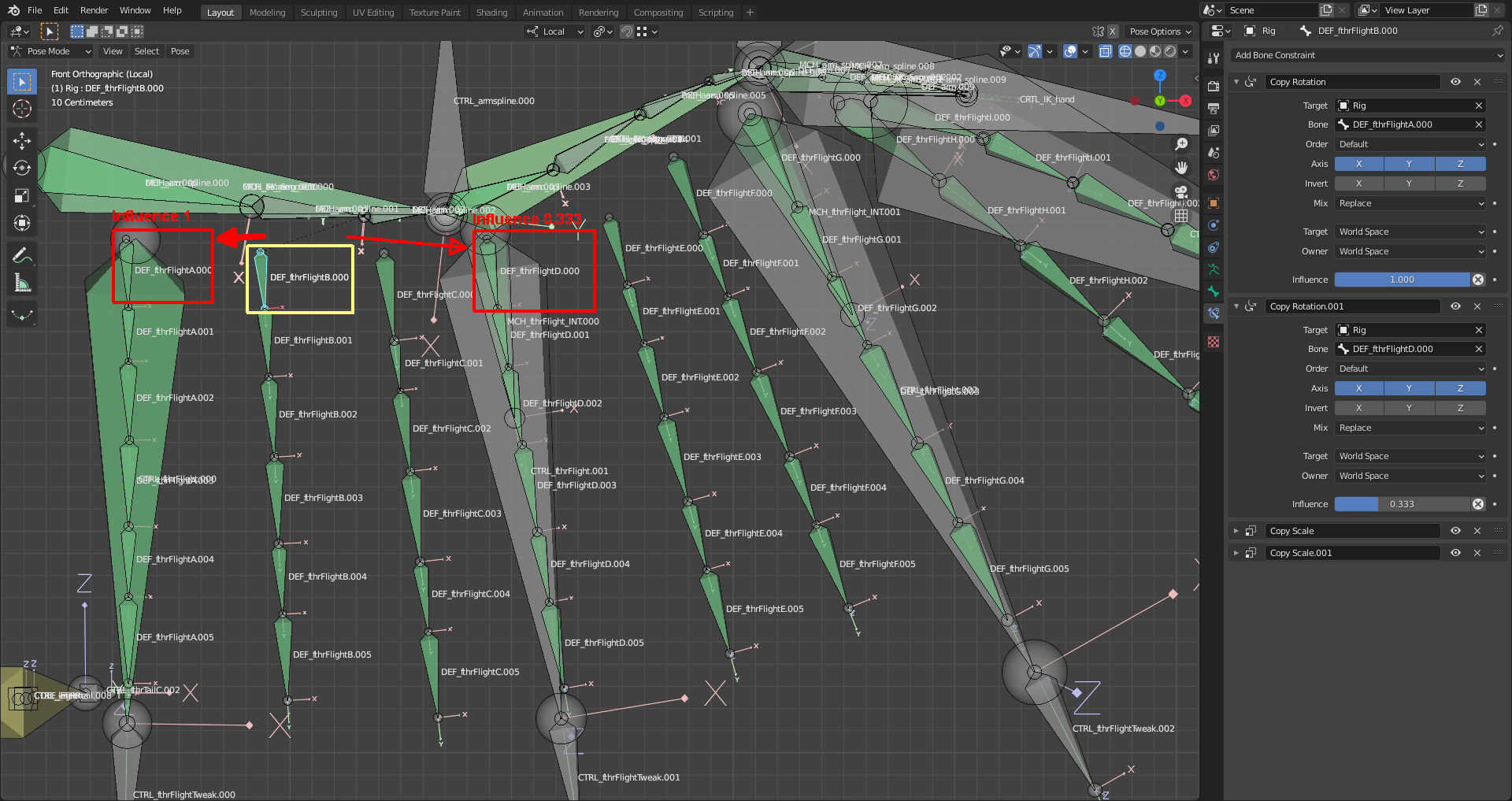 And this causes the snapping of all “Deformation Bones” in between the “Feather Control Bones” CTRL_fthrFlight.000 to CTRL_fthrFlight.003 (the large bones hanging down from the wing “arm”).
All “Bone Constraints” that copy transformations from other bones can act like this.
The “Crown Feathers” of your Piero are influenced by the rotation of “DEF_head.002” around its local X axis (Note: “DEF_head.002″should be renamed properly as “CTRL_crown” as well as some other bones in the head (see my rig here)). This bone is in your file rotated 0 degrees around its local X axis. The “Copy Rotation” constraint maps
1) a rotation of -45 degrees of your “DEF_head.002” bone to frame 1 of the “MCH_crownSpread” action (“Crown Feathers” bend backwards to their extreme position) and
2) a rotation of 45 degrees of your “DEF_head.002” bone to frame 20 of the “MCH_crownSpread” action (“Crown Feathers” bend forwards to their extreme position)
This means that “DEF_head.002” in its default position of 0 degrees rotation aroung its local X axis is mapped to a “Crown Feathers” spread in the middle between these two extremes mentioned above. This position isn’t identical with the “Rest Position” of the “Crown Feather Deformation Bones” in “Edit Mode” so that these bones are spread forwards when switching from “Edit Mode” to “Pose Mode”.
By the way: The frame numbers for the action adressed in your “Copy Action” constraint must be positive! See the Blender 2.93 Manual here:
Frame Start, End The starting and ending frames of the action to be mapped.
Note
These values must be strictly positive.
By default, both values are set to 0, which disables the mapping (i.e. the owner just gets the properties defined at frame 0 of the linked action…).