
Reply To: [??? Unity] How to Apply a Blur-Effect to a Screen-Capture
Forum Archive › [??? Unity] How to Apply a Blur-Effect to a Screen-Capture › Reply To: [??? Unity] How to Apply a Blur-Effect to a Screen-Capture

Your best bet is a custom shader. A blurry image overlay could possibly work, but you’re stuck with the blur effect of that image. With a custom shader you can control how blurry it gets and possibly even create a blur in and blur out effect through scripting.
I found this blur shader online and was able to get it to work with the UI image component which will work for what you want. It comes from here: https://forum.unity.com/threads/solved-dynamic-blurred-background-on-ui.345083/#post-2853442
Shader "Unlit/FrostedGlass"
{
    Properties
    {
        _Radius("Radius", Range(1, 255)) = 1
        [HideInInspector] _MainTex ("Tint Color (RGB)", 2D) = "white" {}
    }
    Category
    {
        Tags{ "Queue" = "Transparent" "IgnoreProjector" = "True" "RenderType" = "Opaque" }
        SubShader
        {
            GrabPass
            {
                Tags{ "LightMode" = "Always" }
            }
            Pass
            {
                Tags{ "LightMode" = "Always" }
                CGPROGRAM
                #pragma vertex vert
                #pragma fragment frag
                #pragma fragmentoption ARB_precision_hint_fastest
                #include "UnityCG.cginc"
                struct appdata_t
                {
                    float4 vertex : POSITION;
                    float2 texcoord: TEXCOORD0;
                };
                struct v2f
                {
                    float4 vertex : POSITION;
                    float4 uvgrab : TEXCOORD0;
                };
                v2f vert(appdata_t v)
                {
                    v2f o;
                    o.vertex = UnityObjectToClipPos(v.vertex);
                    #if UNITY_UV_STARTS_AT_TOP
                    float scale = -1.0;
                    #else
                    float scale = 1.0;
                    #endif
                    o.uvgrab.xy = (float2(o.vertex.x, o.vertex.y*scale) + o.vertex.w) * 0.5;
                    o.uvgrab.zw = o.vertex.zw;
                    return o;
                }
                sampler2D _GrabTexture;
                float4 _GrabTexture_TexelSize;
                float _Radius;
                half4 frag(v2f i) : COLOR
                {
                    half4 sum = half4(0,0,0,0);
                    #define GRABXYPIXEL(kernelx, kernely) tex2Dproj( _GrabTexture, UNITY_PROJ_COORD(float4(i.uvgrab.x + _GrabTexture_TexelSize.x * kernelx, i.uvgrab.y + _GrabTexture_TexelSize.y * kernely, i.uvgrab.z, i.uvgrab.w)))
                    sum += GRABXYPIXEL(0.0, 0.0);
                    int measurments = 1;
                    for (float range = 0.1f; range <= _Radius; range += 0.1f)
                    {
                        sum += GRABXYPIXEL(range, range);
                        sum += GRABXYPIXEL(range, -range);
                        sum += GRABXYPIXEL(-range, range);
                        sum += GRABXYPIXEL(-range, -range);
                        measurments += 4;
                    }
                    return sum / measurments;
                }
                ENDCG
            }
            GrabPass
            {
                Tags{ "LightMode" = "Always" }
            }
            Pass
            {
                Tags{ "LightMode" = "Always" }
                CGPROGRAM
                #pragma vertex vert
                #pragma fragment frag
                #pragma fragmentoption ARB_precision_hint_fastest
                #include "UnityCG.cginc"
                struct appdata_t
                {
                    float4 vertex : POSITION;
                    float2 texcoord: TEXCOORD0;
                };
                struct v2f
                {
                    float4 vertex : POSITION;
                    float4 uvgrab : TEXCOORD0;
                };
                v2f vert(appdata_t v)
                {
                    v2f o;
                    o.vertex = UnityObjectToClipPos(v.vertex);
                    #if UNITY_UV_STARTS_AT_TOP
                    float scale = -1.0;
                    #else
                    float scale = 1.0;
                    #endif
                    o.uvgrab.xy = (float2(o.vertex.x, o.vertex.y*scale) + o.vertex.w) * 0.5;
                    o.uvgrab.zw = o.vertex.zw;
                    return o;
                }
                sampler2D _GrabTexture;
                float4 _GrabTexture_TexelSize;
                float _Radius;
                half4 frag(v2f i) : COLOR
                {
                    half4 sum = half4(0,0,0,0);
                    float radius = 1.41421356237 * _Radius;
                    #define GRABXYPIXEL(kernelx, kernely) tex2Dproj( _GrabTexture, UNITY_PROJ_COORD(float4(i.uvgrab.x + _GrabTexture_TexelSize.x * kernelx, i.uvgrab.y + _GrabTexture_TexelSize.y * kernely, i.uvgrab.z, i.uvgrab.w)))
                    sum += GRABXYPIXEL(0.0, 0.0);
                    int measurments = 1;
                    for (float range = 1.41421356237f; range <= radius * 1.41; range += 1.41421356237f)
                    {
                        sum += GRABXYPIXEL(range, 0);
                        sum += GRABXYPIXEL(-range, 0);
                        sum += GRABXYPIXEL(0, range);
                        sum += GRABXYPIXEL(0, -range);
                        measurments += 4;
                    }
                    return sum / measurments;
                }
                ENDCG
            }
        }
    }
}
Create a new unlit shader (Create > Shader > Unlit Shader) then open it up and copy the above shader code and replace everything in the file you created. Save it and now you have the shader. Right click on the shader itself in the project and create a material (Create > Material). This will create a material with that blur shader.
Next you’ll need to apply this to an empty image component with the UI system. You’ll assign the material you created to the image component as such:
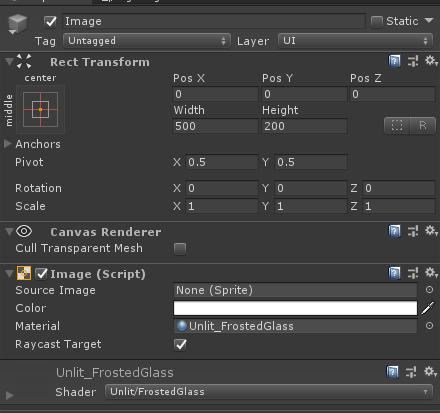
Note this should not have an actual image for the source image slot. It’s just the blur effect. Here is an example of this working:
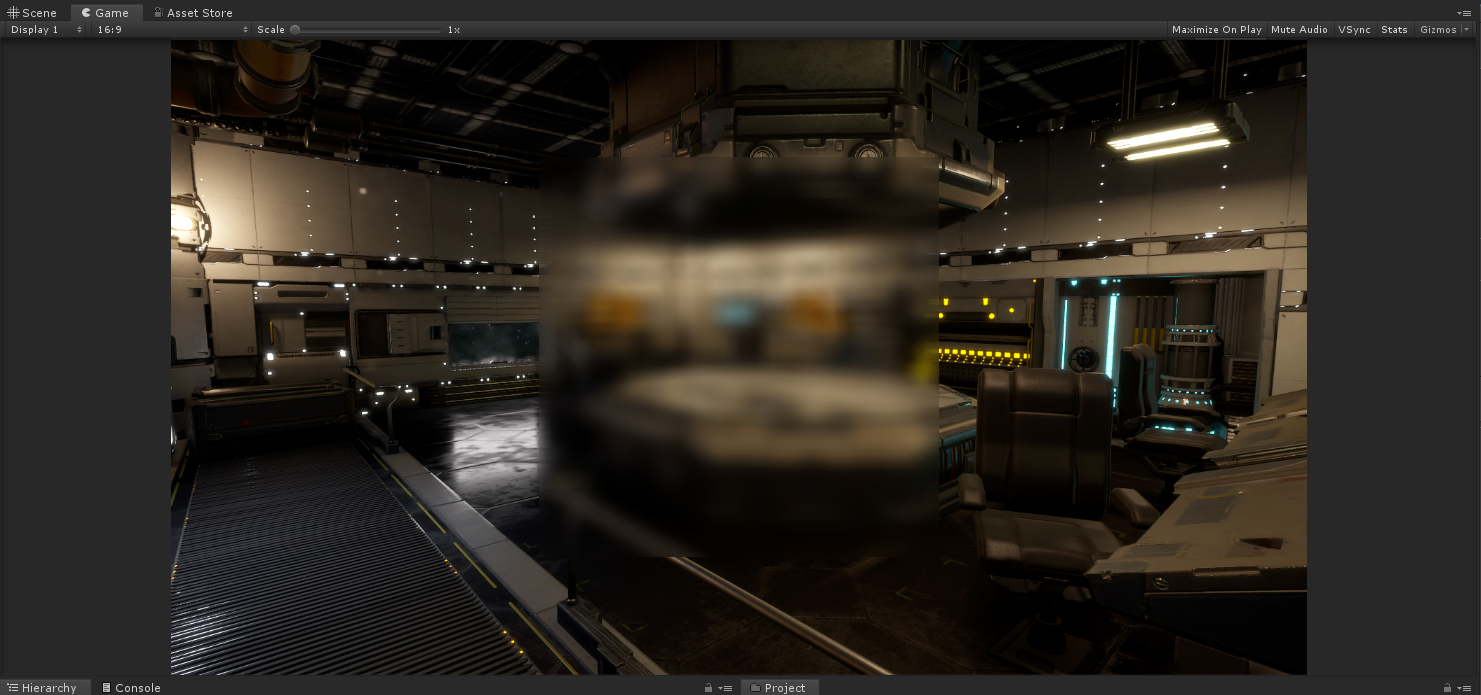
Let me know if you need me to clarify anything or you’re looking for something else.