Small note for future reference (as of Oct 2024).

Forum Archive Small note for future reference (as of Oct 2024).

Viewing 9 posts - 1 through 9 (of 9 total)
  • Author
    Posts
  • #19052
    Randall Buchmann
    Participant

      I’ve found the main source of all those ghost edges is actually the Bevel modifier. If you turn off the Bevel modifier, those ghost edges all go away. It is a bug, but it’s entirely contained in the modifier: The ghost edges are the bevels.

      Once the bevel mod is turned off, then you can edit in any mode you like. Just remember to turn it on again when you are done, or when you need to bevel the buttons, etc. Be ready for the ghost edges to reappear when you do!

      #90680
      Leo
      Participant

        I’m sorry, but I doubt that. I’ve read a lot here in the last few days that there are problems with bevels, but I think it’s more a problem with the mesh (misaligned normals, double vertices or something similar) Or are ghostedges, edges that have no influence on the geometry and are not editable? A graphics bug, so to speak?

        If not, can you show a screenshot? However, I am also working with version 4.1 and if this is indeed the case in 4.2, please correct me.

        #90681
        Omar Domenech
        Participant

          Yeah I know what you mean by those ghost edges, some people have asked about those. As Leo says it’s just a visualization thing caused by the Bevel modifier when you have the “Display Modifier in Edit Mode” enabled. But it’s just a visual thing, it doesn’t do anything bad.

          #90682
          Randall Buchmann
          Participant

            I’m reporting what I saw. The ghost lines are not selectable or hidable. And they absolutely exist in Blender 4.2. The way to hide them is turn off the bevel modifier in edit mode. Worked for me at least!

            #90683
            Martin Bergwerf
            Participant

              Sure, Randall, but it’s a feature, not a bug. It’s just how these Beveled Edges are visualised in Blender in X-Ray Mode these days. No need to panic, nothing special happening here, keep moving 😉

              #90684
              Randall Buchmann
              Participant

                Heh. Maybe 4.3, it’ll all become moot, but at least for now, I’ll leave a marker on the trail for those behind me, so they don’t freak out. Some of us Blender newbies are more used to glitchy software than others. 🤣

                #90685
                Leo
                Participant

                  It’s good that we all get on so well here and there are no stupid questions, didn’t even albert einstein say that? 🤣

                  #90686
                  max k
                  Participant

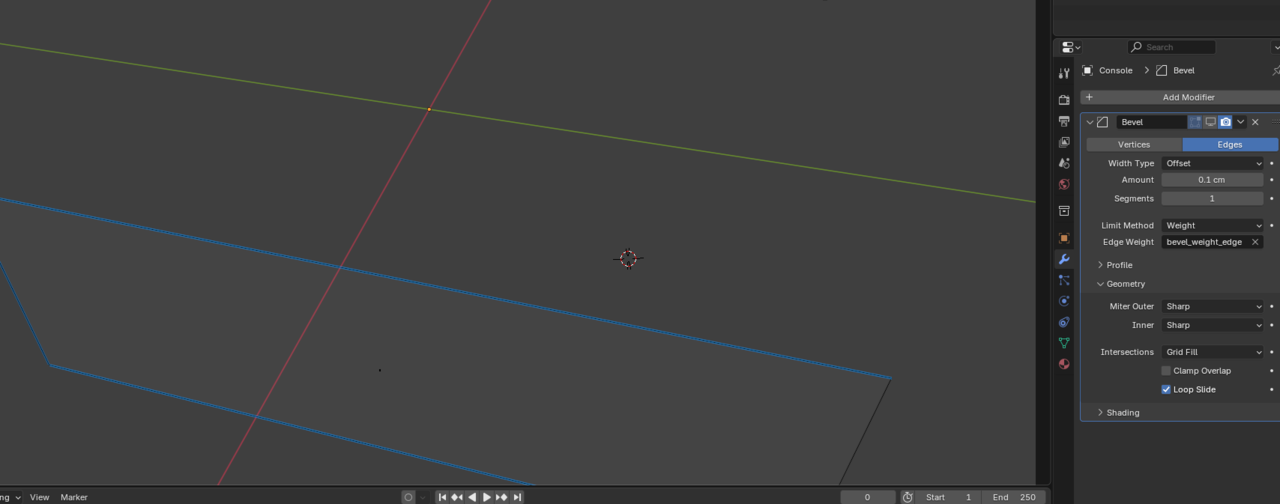
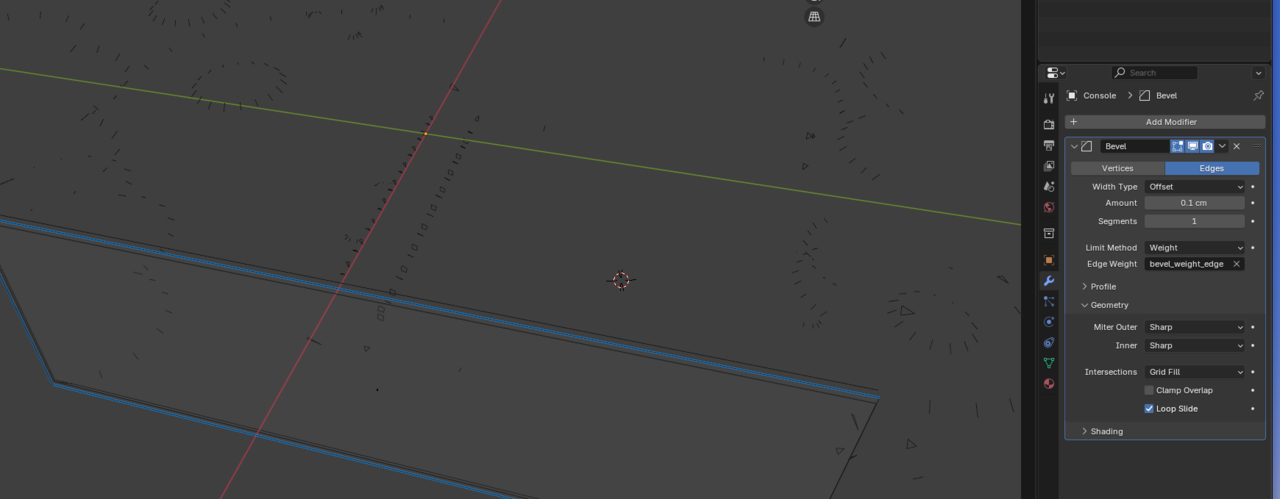
                    I took a screenshot of the ghost lines with and without the bevel turned on. I’m  not sure how this is a feature exactly, but I’m interested in learning more.

                     At this point, I’m inclined to agree with Randall’s assessment, but I look forward to understanding what the use is of visualizing the bevel data of the hidden areas in wireframe mode. Thanks in advance

                    3 at 11.49.15 AM.png

                    ^ Bevel disabled in view / Wireframe mode3 at 11.49.08 AM.png

                    ^ Bevel enabled in view / Wireframe mode

                    #90687
                    Omar Domenech
                    Participant

                      I don’t know if it’s useful or not, just a feature the Blender devs put on there. Perhaps a way of reminding us there’s a Bevel Modifier in our model? Don’t know, but better to have it than not I guess? 

                    Viewing 9 posts - 1 through 9 (of 9 total)
                    • The topic ‘Small note for future reference (as of Oct 2024).’ is closed to new replies.