Hi Gerard @gerardjan ,
You can make a heavily Subdivided curved Mesh without the hole and then model the holes in a flat Surface and Shrinkwrap it to the Curved Mesh (might need to play with the Wrap Method and place the Flat Mesh close to the Curved Mesh):
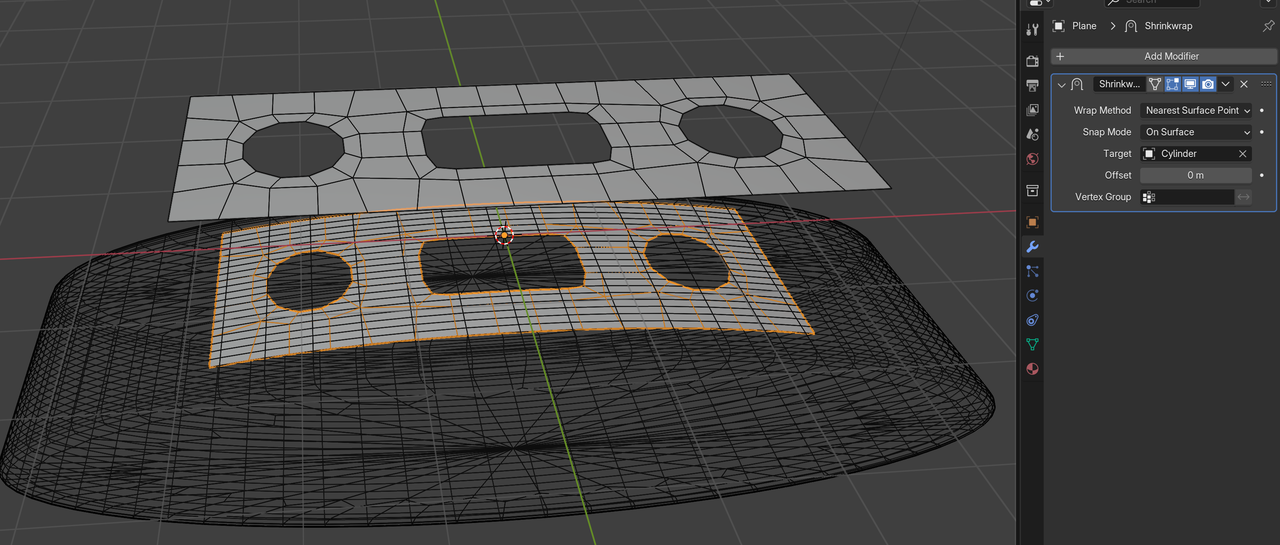
When happy with the result (test it with a Subdiv Modifier), you should probably Apply the Shrinkwrap Modifier, so you can Delete the helper Mesh and model the rest of the curved surface from the, now bend Plane.
Booleans are also an option, but might not be ideal when using Subdiv.
Sascha’s second method is shown in the Pothead Course: https://cgcookie.com/courses/pothead-create-a-hard-surface-character-in-blender

