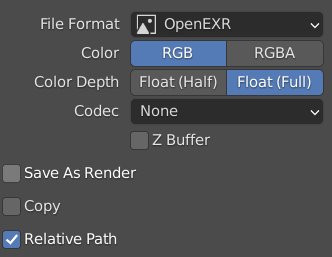
They should be saved correctly! Just be sure that ‘Save as Render’ is not checked while saving so that no color management or gamma conversion will be applied.
Photoshop, on the other hand, is a bit different. I’m not sure exactly how it works, but leaving the exposure at 0 and the gamma at +1 will keep it from messing things up.
Here’s the important bit: If the image was baked as sRGB, import it as non-color but if the image was baked as linear (like all 32 bit images in Blender are) then import it as sRGB, whether processing it through Photoshop or not. What we don’t want is to do the sRGB correction twice or skip it entirely.

