Hi Colin, as far as I know, the text ,being a Curve, gets it’s resolution from the render setting here:
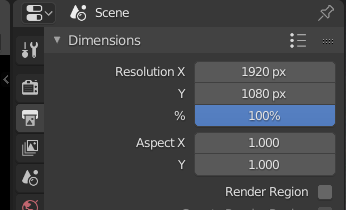
whether that is in the VSE or not.
If you increase the size of the text, it will look less pixelated. (It seems that there is no anti-aliasing on text renders, like on the text in the Interface.)
So, basically I don’t know of a way to get your text to look sharper in Blender and I don’t know how other programs handle this, however, you can try and ask this on BlenderEveryday later this day. Do this and I will give the question a ‘love’, that way it will get to the top and gets more likely to be answered. (Although this is a Sculpt Special…)
https://blender.community/c/today/VXdbbc/
There will probably be a special post made for asking questions later.

