
Reply To: Two questions about text elements?
Forum Archive › Two questions about text elements? › Reply To: Two questions about text elements?

Text elements will only display a string value. So when you have points.text += 1; It thinks you’re trying to build a word or a sentence since it treats the 1 as a character and not a number. You need a separate int or float variable to keep track of points, you then use that for your points text as such:
public int playerScore;
public Text pointsText;
pointsText.text = playerScore.ToString();
Since playerScore is an integer it needs to be “converted” to a string and you do that by using “ToString()” after it. You could also combine it with an actual string and it won’t be necessary like this:
pointsText.text = "Player Score " + playerScore;
Also just to be clear, you would increment the playerScore, the text would only display what that value is. So you’d probably update the playerScore and pointsText at the same time as such:
void UpdateScore ()
{
playerScore ++;
pointsText.text = playerScore.ToString();
}
This would be called anytime you wanted to update the player’s score which would then also update what the text should say. Using “playerScore++” updates the value by 1, you could also replace it with a higher value if you’d prefer.
The UI by default uses Screen Space, which means it’ll display as an overlay for your device. This works fine for most traditional hardware such as a PC or consoles, but VR works off a two camera system so it can’t be used in that way. Creating a HUD for VR means the UI elements will be in world space. These would essentially float in front of the player, or could be attached to other objects. To change a canvas to world space you need to select it and on the “Canvas” component change the render mode to World Space as such:
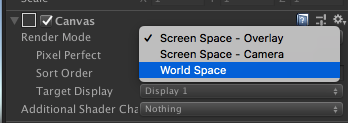
You can then resize the entire canvas just like you would any other game object and place it in front of your camera. You could also make it a child of the “eye” camera so that it’s always moving with the head.