Thanks Jonathan
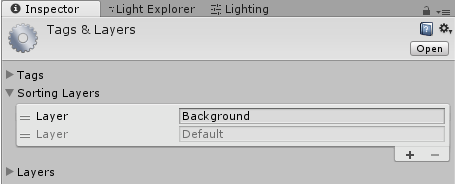
i don’t know if this was also changed on 2017, but i just found that there is an implicit order in the layers.
I was having trouble trying to show an object in the default layer until i reorder it(i had it inverted, default first)
It seems the lowest layer(Default) has render priority over the previous layer(Background).
So in this case no matter what value i put in the “order in layer” i could not make an object in background render before an object in Default.
But i didn’t know how to change that relationship until i found this. it seems it can only be changed while adding layers. They can be reordered in this tab.