Well, you already had Applied the Scale in the Screenshot you provided, so Applying it again didn’t make a difference.
(And Applying or not Applying the Scale shouldn’t behave differently between blender Versions.)
So, here we go again, this time with a Gradient Texture and in Blender 4.3.2:
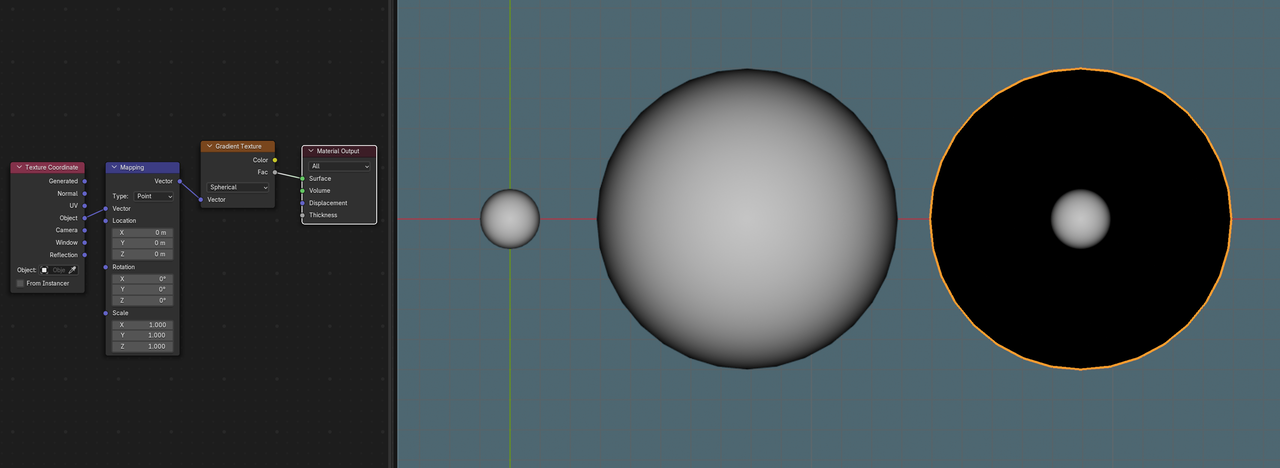
Now, you can’t un-Apply the Scale, but what you could do in this case, is set the Y- and Z- Dimensions (that are 14.6m in your Image) to 2m, then Apply the Scale and then Scale it back up in Object Mode to 14.6m.
But, of course using the Mapping Node to change the Scale of the Gradient Texture also works (although I’d recommend to try the trick I mentioned, just to get a better grasp of what is happening and why).

