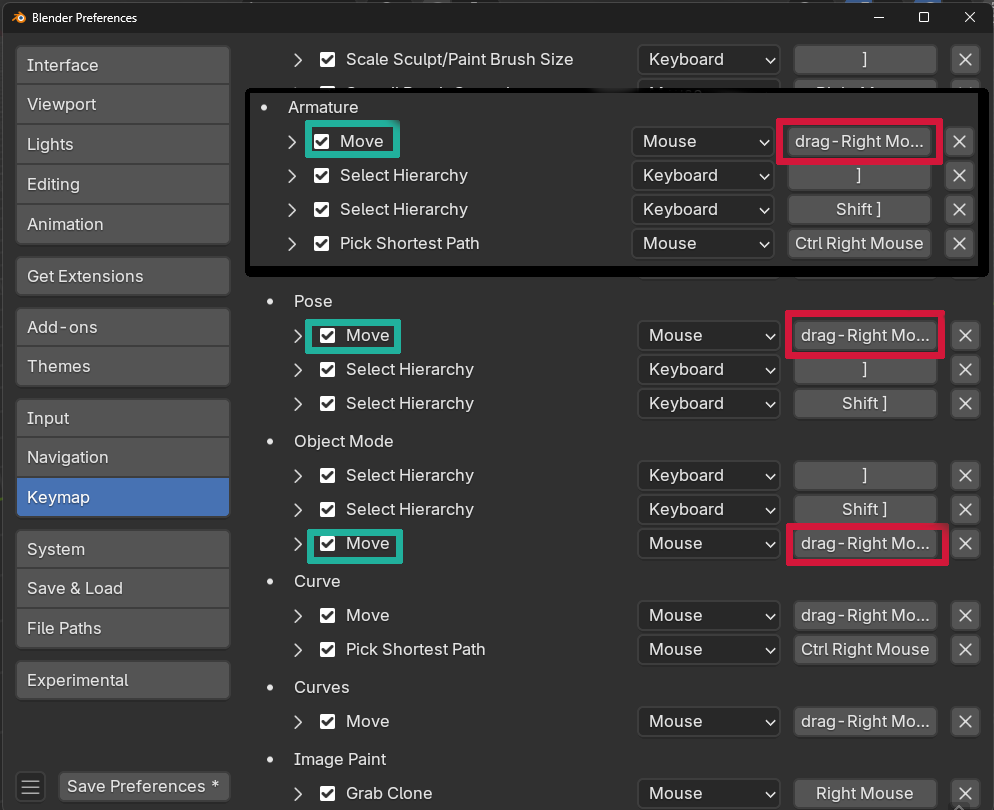
I not 100% sure, but I’m pretty sure you have to disable the keymapping to stop it from doing that. If you want to do it just goto preferences->keymapping->Then at the top click key binding then in the search type: Right
Scroll down until you see drag-Right Mouse on the right hand side.(Red) The ones that say Move to the left of that will be the ones you want to disable. To disable uncheck the box to the left of where it says Move.(Cyan/Blue) For objects in object mode it will be the one under Object Mode. For bones when you’re in edit mode it will be the one under Armature. For the Bones in pose mode it will be under Pose. For other things in edit mode will be under their heading like Mesh, Curve, and Grease Pencil Edit Mode for example.