Hi Ian @technicolorwildlife ,
That is a good question, but almost impossible to answer.
It highly depends on the scene you are rendering (among other things).
If your GPU is so outdated, that you might as well render with CPU, you can enable Path Guiding (helps mostly with interior scenes).
Further, don’t get too overwhelmed by all the Settings; here are the ‘most important’ ones you can focus on:
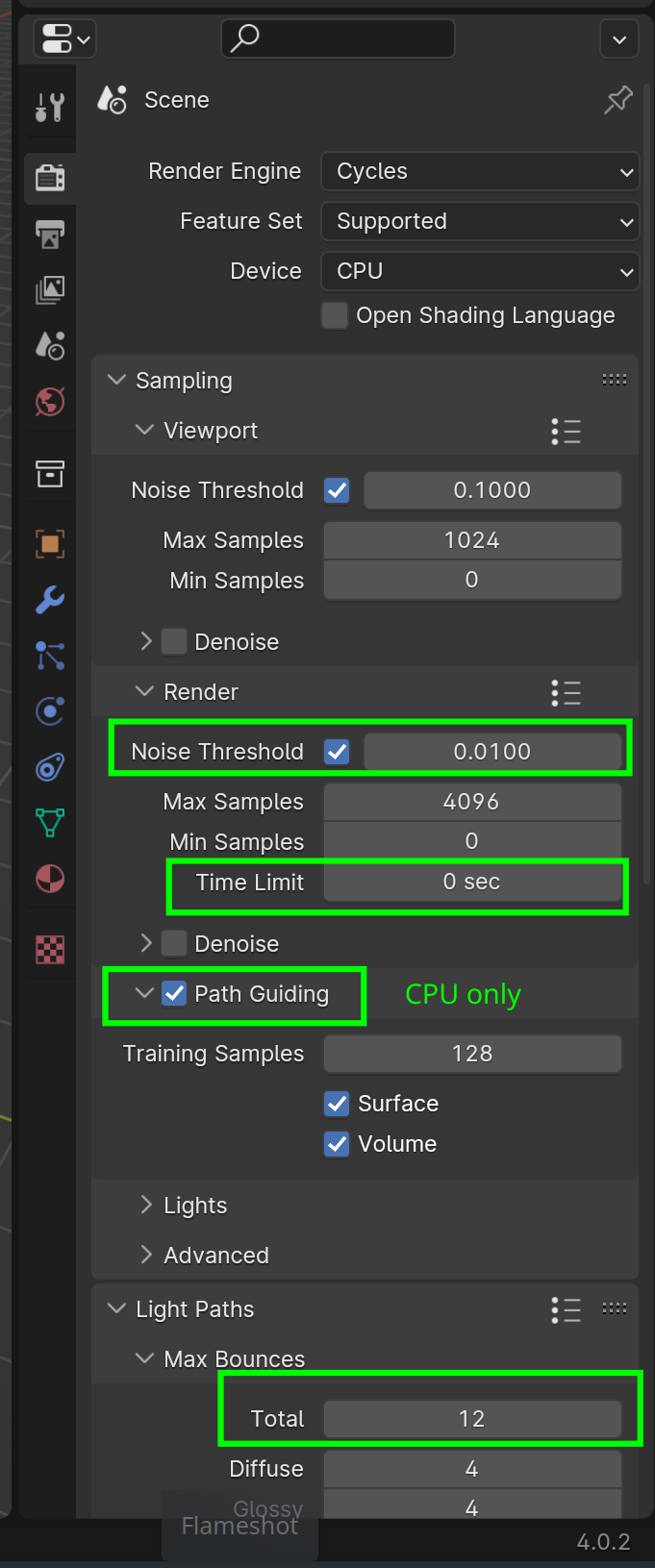
Noise Treshold is what used to be called Adaptive Sampling and means that if the difference (per Pixel!) is less than that value, it stops rendering (that Pixel).
Setting a Time Limit might be useful (0 sec disables it).
Reducing the Light Bounces will usually reduce Render time as well.
What I used to do a lot, with my old computer, was too use Render Region (CTRL+B when in Camera View) to experiment with optimizing Render times.
You will probably not get your Render times from 5,5 hours down to half an hour or so.
There are some Denoisers you could try. Blenders own Denoisers, Super Image Denoiser (free) and some more that I haven’t tried.
I’m not using Denoising myself, but their quality has improved a lot. Also for test Renders it can be very useful.

