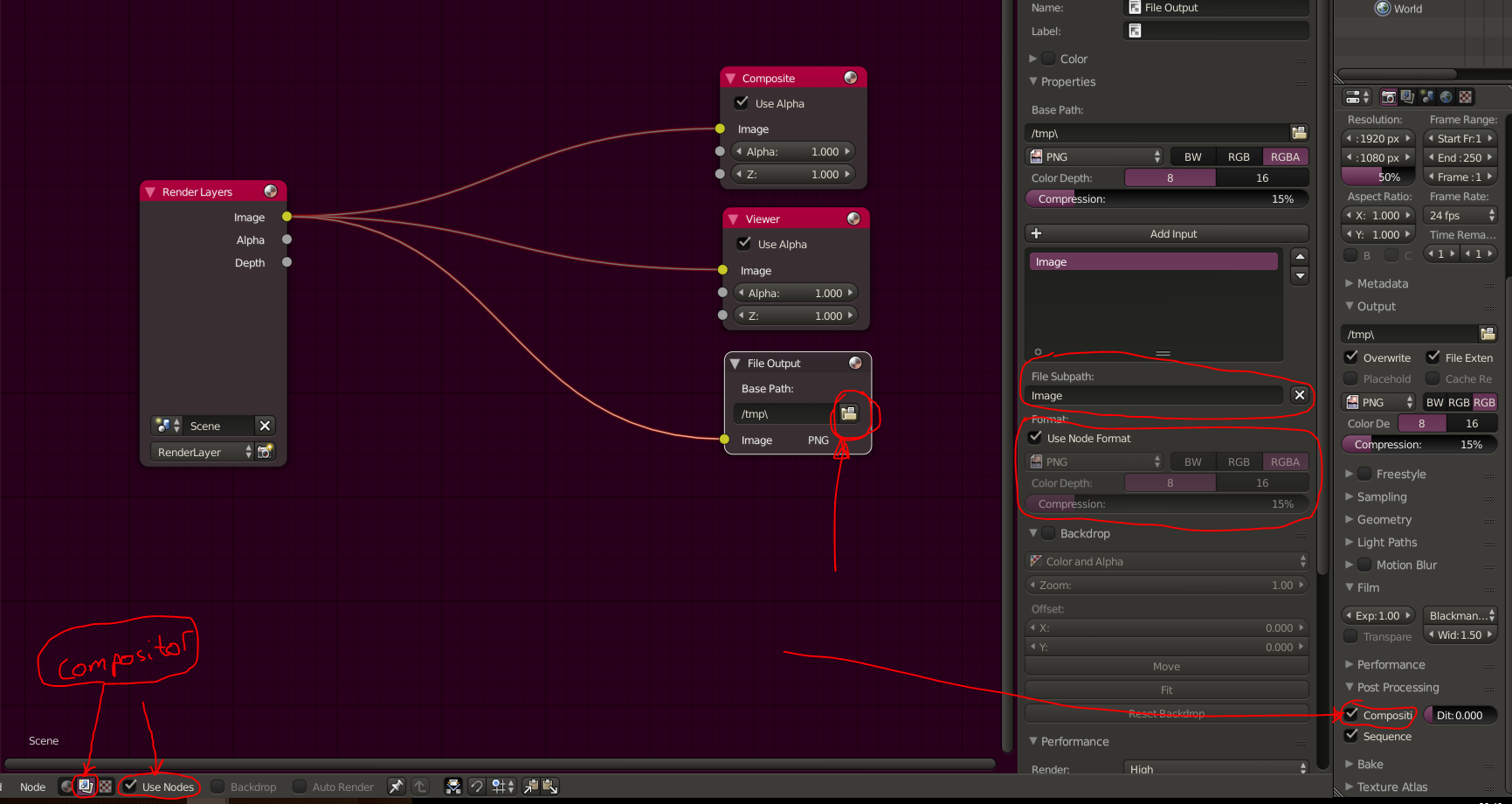
You can use a simple compositor setup in the node editor to automatically save your renders as you do them. Once you know how to do it, it literally takes seconds.
Go into the node editor and click the buttons highlighted. Also add the viewer node and file output node. The folder button on the file output node will let you select where the file will be saved. If you click the file output node to make it active, you will see some options in the “N” panel on the right. The file subpath option lets you set the name that the render will save as. Also, make sure you have compositor checked in the render settings panel under “post processing” , this will tell Blender to run the render through the compositor which will save your image. Once you know what you are doing , you can also add other nodes before the file output node to “post process” your image before it is saved with effects, filters, colour corrections ect. Either way, that basic setup should save each render you do automatically 🙂
(RIGHT CLICK IMAGE – OPEN IN NEW TAB TO ENLARGE)