
Reply To: Orientation of Bones in Blender and Unreal Engine
Forum Archive › Orientation of Bones in Blender and Unreal Engine › Reply To: Orientation of Bones in Blender and Unreal Engine

Hi Omar,
I’m not really sure if it’s the Unreal knowledge that’s required. It seems a lot to do with the FBX export settings from Blender and maybe something to do with the orientation of the bones in Blender, I’m not sure.
Thanks for the heads up Adrian. @waylow is Wayne Dixon?
Hi Wayne,
I think they did say it was Rigify. There is an addon from Unreal that facilitates export from Blender to UE but I’m not too sure how to use it so I have been exporting the model as an FBX to UE manually. I’ve found that tweaking the Forward and Up axes under Transform and the Primary Bone Axis and the Secondary Bone Axis can result in the x-axis of the bone in the “correct” direction. However, this results in the Root bone of the model being oriented in the “wrong” direction and I am using C++ to control the pitch and yaw of the model in Unreal. This causes the character to do some weird looking stuff. I’ve tried over 20 different orientations with the axes and had no luck, so I was thinking that maybe the skeleton had to be remade. I’ve started looking at a course on Udemy to that end:
Create an Animated Character in Blender 2.9
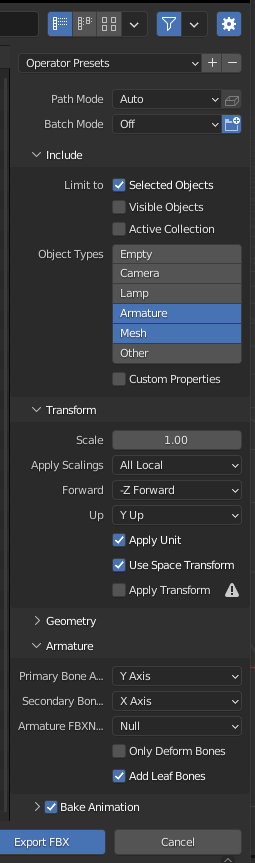
The GameRig looks useful, hopefully, it will help, I will try it.
I’m wondering if this is a limitation of blender, someone was showing me a page that said something like that and I think it was said that Maya was capable (?). I only know a little blender even though I set out to learn it, I ended doing a lot more in Unreal Engine and I know very little of Maya. Have a look at the post below: