Do you set the bevel via a modifier and then by weight? or did you set it manually? I would start by assuming that duplicate vertices have crept in there
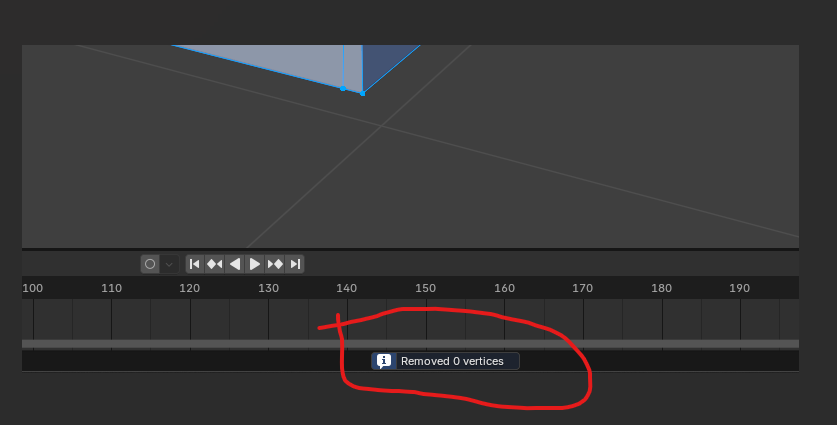
Check if you have duplicate vertices, the easiest way is to mark everything with A and then press the M key in edit mode and then “Merge by Center”. For a certain area you can also use ALT + Z (so that you can also mark all vertices underneath) and then mark only the area -> press M and “Merge by Center”.
You then have to look for a blue status message at the bottom center. I don’t know why blender made it so small but you can see there if vertices could be merged
Another simple trick is by simply grabbing a vertice in the area and moving it back and forth with the mouse. There may be another one hidden behind it.
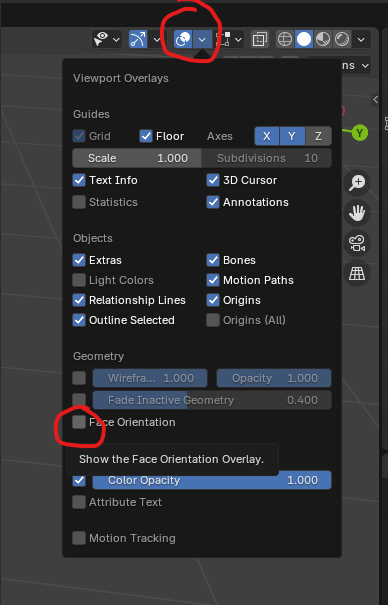
This can sometimes lead to problems, too if the faces are not aligned correctly. You can click on “Viewport Overlays” in the top right-hand corner and then switch on Face Orientation. If the faces are all displayed in blue, they are correctly aligned, otherwise you would have to mark the red faces once and then flip them with ALT + N or recalculate them. See picture