Reply To: I messed up somewhere and now my x rotation is set to -360. Even if I set it back to 0, whenever i change kayframes and come back it always goes back to -360. How can I fix this?

Forum Archive I messed up somewhere and now my x rotation is set to -360. Even if I set it back to 0, whenever i change kayframes and come back it always goes back to -360. How can I fix this? Reply To: I messed up somewhere and now my x rotation is set to -360. Even if I set it back to 0, whenever i change kayframes and come back it always goes back to -360. How can I fix this?

#27292
Alexander Tokarev
Participant

    1. Open Properties Panel (hit N). 

    2. In Timeline, move the playhead to the keyframe whose X Rotation is -360. (This is shown in  Transform / Rotation section of the Properties panel.) 
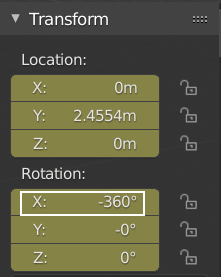
    3. Type 0 into Rotation “X:” field.

    4. With your mouse over this field, press I. This will create a new keyframe in place of the old one, which will overwrite (and save) the old rotation values.
