Reply To: How to cast hard shadow on ground plane?
Forum Archive › How to cast hard shadow on ground plane? › Reply To: How to cast hard shadow on ground plane?

Good question. The main thing to keep in mind is that the clipart shader is using emission shaders to generate solid colors and minimize realistic shading gradients. This also means that the object is emitting light and will not accept shadows.
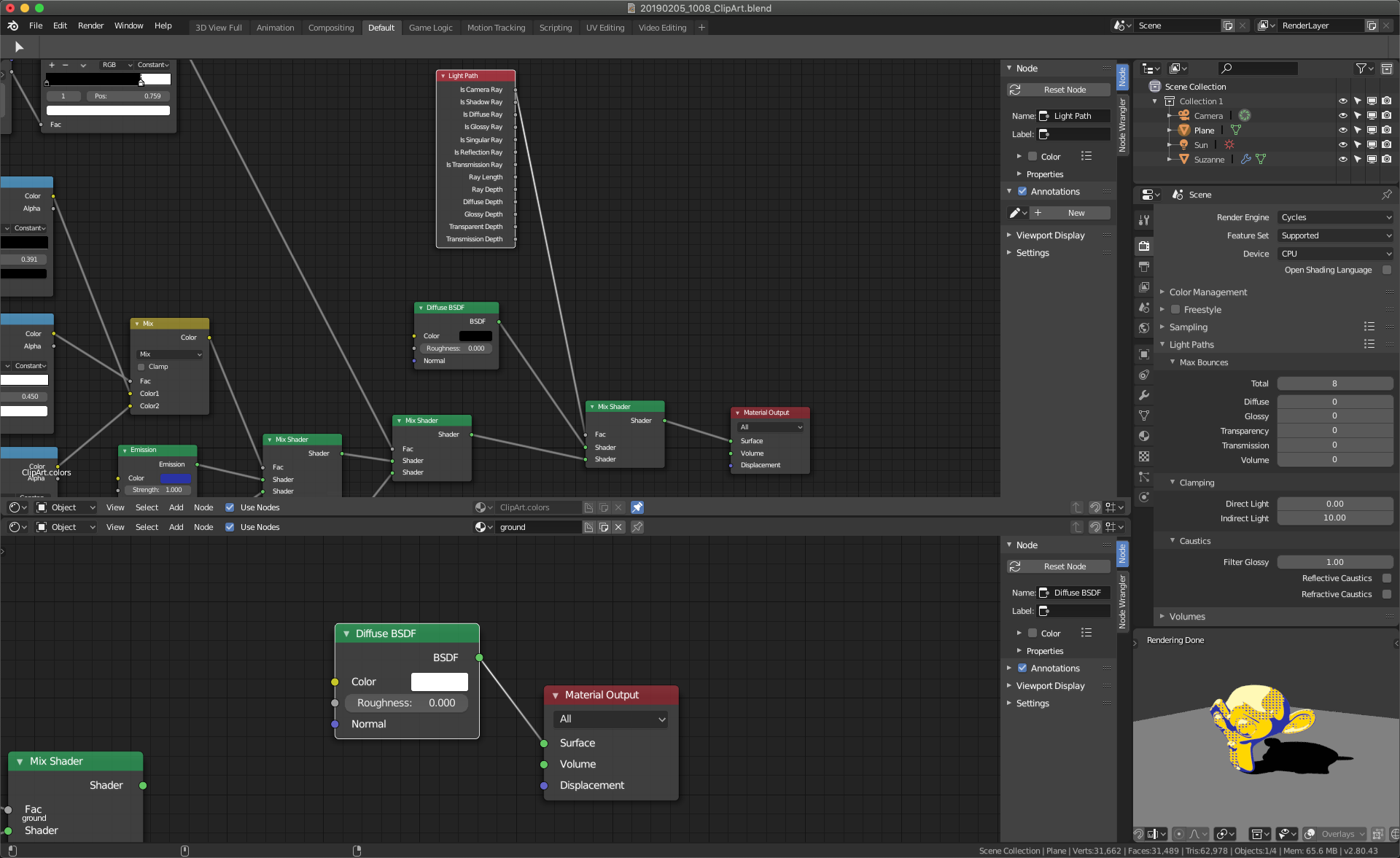
So the first thing to do is swap the ground plane material for a simple diffuse shader (so it can accept shadows). Immediately you will see a shadow appear but you’ll also see yellow light flowing on the ground and the shadow.
Next step is some visual trickery on the monkey’s material. In short you want the material to be different in the scene than it is in the camera. I.e. you want the scene to see the monkey head as a black diffuse material so it A) won’t emit light on the ground but B) will cast a shadow. However you want the camera to see the emissive clip art shader. You can accomplish this with the Input -> Light Path Node. Add another mix shader to the end of your clip art shader and use the “is camera ray” socket of the Light Path node as the factor of the new mix node. Then add a simply black diffuse material to the first shader slot of the mix and your clip art output as the second shader socket.
Those steps should deliver a crisp shadow on the ground plane while maintaining the solid emissive colors of your clip art material. Here’s a screenshot of the two materials + result: