Course Library
Learning Paths
Free Courses
Learn Blender 3D in the way that’s right for you.
Inner Circle
Where members share progress and help each other learn.
›
The Commons
A free Blender community open to artists of all skill levels.
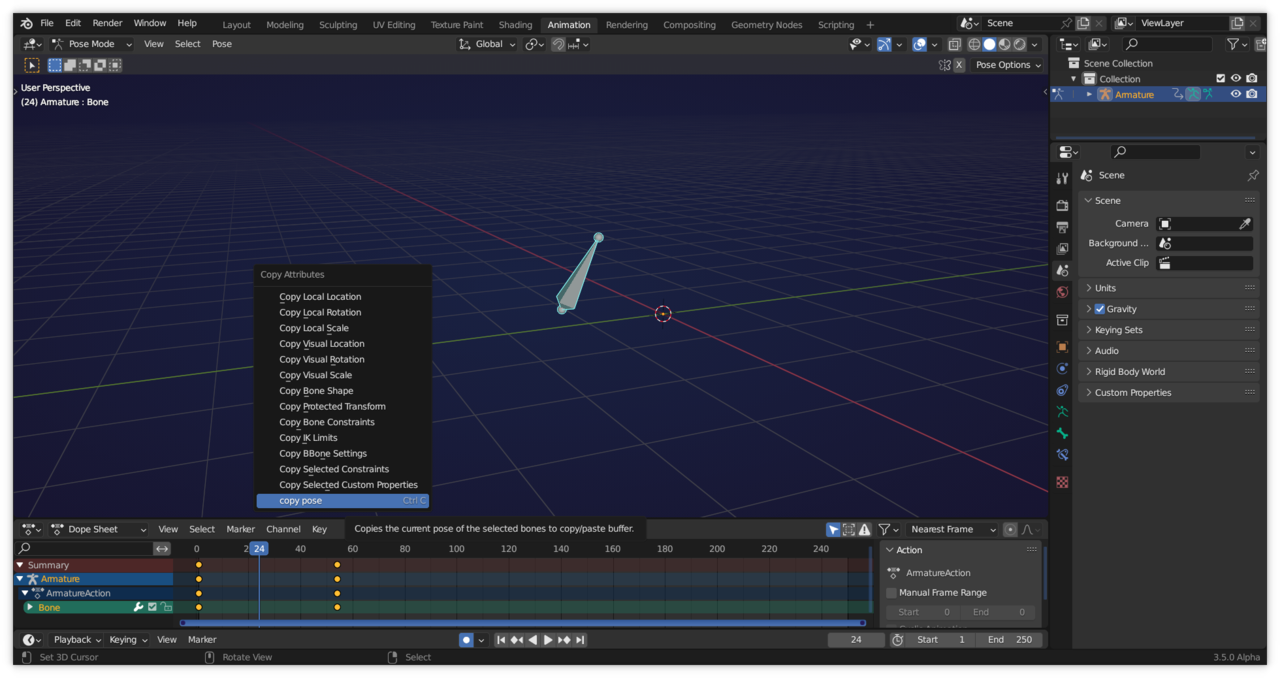
Forum Archive › from 7:03 he borrows pose data from a none keyed frame, Wayne copies it then pastes the pose information onto a later keyed frame and saves the pose, this is not working when i try to do it. › Reply To: from 7:03 he borrows pose data from a none keyed frame, Wayne copies it then pastes the pose information onto a later keyed frame and saves the pose, this is not working when i try to do it.
Hi @puddles ,
You are right, that doesn’t work the same anymore.
You need to hover your Mouse Pointer over the 3D Viewport and then you can use CTRL+C, CTRL+V.:
Or you can find it in the Pose Menu.