I don’t know if this is exactly the same case with @bbbbb as here in the picture, otherwise explain in more detail or send a screenshot
So the one in the picture looks like the normals are not correct.
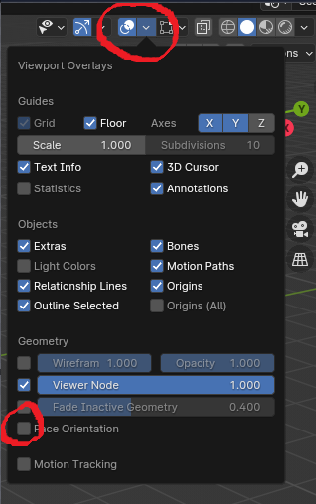
Click on – Show Overlays -> Face Orientation in the top right corner.
If faces are red, they must be recalculated. To do this you have to go to Edit Mode -> Face Mode -> select all faces or only those that are red and then ALT + N.
If it is only one face, flip option is sufficient, if several are affected, use the recalculate functions.
I would perhaps check the vertices first. So Edit Mode -> Vertex Mode -> A (mark everything) -> M -> Merge by Distance.
At the bottom of the bite it looks as if there are several vertices on top of each other.

