
Reply To: [ENDED] BC2-1803 – March 2018 Class Homepage – Creating Stylized Characters with Blender
Forum Archive › [ENDED] BC2-1803 – March 2018 Class Homepage – Creating Stylized Characters with Blender › Reply To: [ENDED] BC2-1803 – March 2018 Class Homepage – Creating Stylized Characters with Blender

Homework Submission – Week 4
All right, I think I’m satisfied with where I’ve got things.
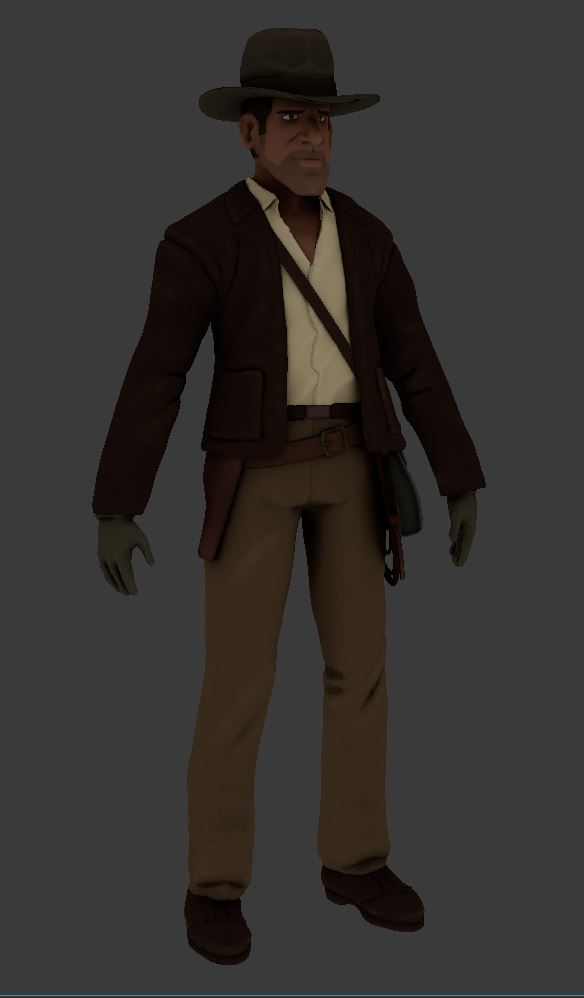
I went with the non-shader style of texturing because it suits the character, which is based on a 2D cartoon-style concept to begin with. I understand now what everyone says about how Blender’s painting functionality could be better. Not so much with the paint tools themselves – I suppose they’re fine enough – but file-handling, referencing, linking, all of that is somewhat convoluted and unforgiving, and I imagine it could be done better.
After texturing the character, I modeled his typical equipment and textured it as well. And this is where I ran into a problem. Indy’s jacket is supposed to drape over the items around his waist, but I failed to account for that when I sculpted and retopologized the jacket. Because of the shrinkwrap modifier I couldn’t edit either object without severely distorting the shrinkwrapped mesh. It took a little while, but the way I worked it out was by blocking in a very simple mesh to surround the jacket, and then used it like a lattice, giving the original sculpt and retopo’d jacket a mesh-deform modifier and binding both of them to it. In that way I was able to edit both objects at the same time by editing the lattice. I’m glad I learned this utility, but it might have ultimately had little point, since at the very end of everything I ended up applying all the modifiers, decimating the mesh, and deleting all the sculpts anyway.
And before I forget, my ax texture, one of the very first exercises I did at CGC. I had looked at all of the other axes people had been submitting and decided to go with an old, very rusty and neglected blade because I hadn’t seen anyone else take that approach. Sad to say I was rather unambitious with the handle though, but I did try to make it look like old wood: