
Reply To: Does Melvin UI Script Need to be Run with every Blender Start?
Forum Archive › Does Melvin UI Script Need to be Run with every Blender Start? › Reply To: Does Melvin UI Script Need to be Run with every Blender Start?

Hi Ingmar,
There’s a couple ways to get it to run automatically.
You can install it as an add-on, as I mentioned in the linked thread. This would be a good solution for people who didn’t want to have to link in the character AND the script into each new animation file.
You would just link in the character, and because the UI is installed as an add-on. It will show up automatically.
Although if you make changes to the UI, you would need to delete the addon and reinstall.
A better way, in my opinion is to actually link it in when you link in the character.
And if you have “Register” set in the text editor it will load every time you open the file.
This won’t be greyed out if the name of the text file ends with “.py”.
(in this screen shot I don’t have a .py loaded)
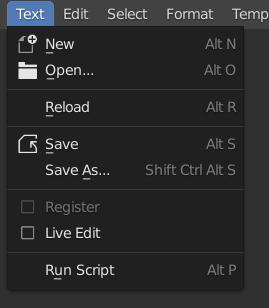
You do have to link it in once, but then if you make changes etc, it will automatically be propagated to all your files.
Re BlenRig.
No I have not used it, I found it too overly complicated. Rigify is much more flexible these days and since they have added the ability to add feature sets (your custom rig types) it will make it more extendable. You might want to check out CloudRig from Demeter over at the Blender Animation Studio.
Re the multimodifier
This setting will use the input from the modifier above it in the stack as the input.
I don’t have a good example of this but from memory you can check out the Big Buck Bunny Rigs that I updated for the 2.7x series of Blender. (that is available on the Blender Cloud). This uses that setting for the 2 different rigs, (one for the body and one for the face)