
Reply To: Creating an Epic Summer Render for the Blender Market —- 2 questions: Post Live Stream
Forum Archive › Creating an Epic Summer Render for the Blender Market —- 2 questions: Post Live Stream › Reply To: Creating an Epic Summer Render for the Blender Market —- 2 questions: Post Live Stream

1. What were those other N panel tools on your blender copy?
In my sidebar tabs I have:
- Item
- Tool
- View
- All the usual stuff
- Screencast Keys
- Modeling
- Mesh Machine
- Animation
- Animation Nodes
- AnimAll
- Rigging
- Auto-Rig Pro
- Dynamic Parent
- Create
- Spline Generator (Add Curve: Extra Objects)
- Photographer
- Box Cutter
- Mirage
I dislike how every addon tends to make its own sidebar tab, so I often go through and customize which tab they show under. It’s a bit of a PITA, but hopefully it won’t be necessary for long.
To change what tab an addon shows under (here I’ll change the curve addon to be under Modeling, since a tab labeled Create is kinda dumb), find out where the script path is in the Preferences.

Open they python file and CTRL+F to find anything called bl_category:
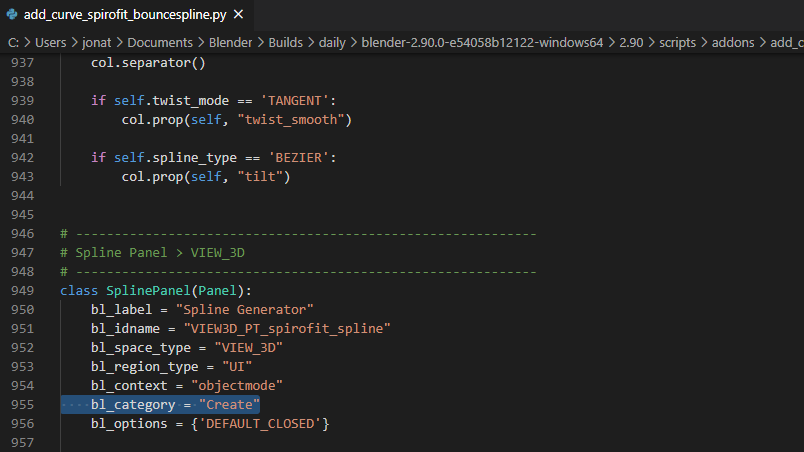
Change that to something else (I’ll change it to Modeling), and it’ll now show up under a tab with that name when you restart Blender.
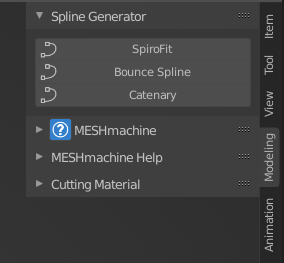
Probably more work than it’s worth, but I enjoy trying to keep it tidy.
2. I think it would be fun for the next live stream like this to do a few contests of objects going into the summer render for the blender market.
I like the idea of a contest with limited assets! That could certainly help people to get creative within the limitations. I don’t think it would work for a BM sale render though because 1. I can’t distribute the assets 2. The assets I do use need to be from the market. So if you want to make models and put them on the market first I can certainly use them then, but it seems more straightforward to have the contest or exercise a separate thing entirely.
I’m trying to do something somewhat similar for each Fundamentals course exercise – set fairly restrictive limitations and see how far people can take it within those boundaries.
I’m glad you enjoyed it and hopefully I’ll have something cool to show in a couple days!