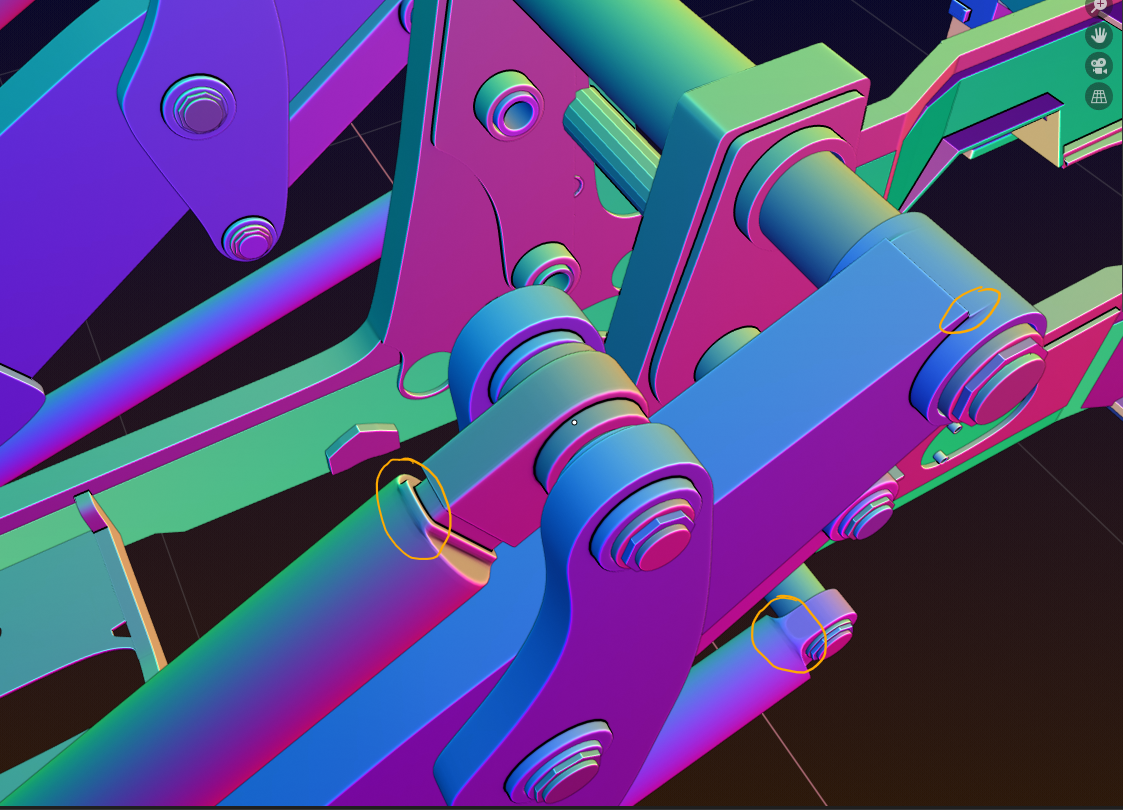
Ok. I need some hard surface modeling guidance from the gurus of the group. I am having a hard time making smooth and crisp transitions from square/hard edges to circular topology. Three instances on the loader arms are causing me grief and I am unsure how to proceed. It acts like the Bevel is “bleeding” over areas where it shouldn’t. I’m sure it’s an easy fix but not sure what it is and I’ve tried a few things but with no success. I think I need maybe some more supporting geometry or “holding” edge loops in more places but maybe it’s something else. It’s hard to add to the circular cross section parts to give more edges to them to work with and keep them circular haha. I’m dreading that is perhaps the solution.
Link to my progress file: Loader Arms – Blanchsb
I turned on the normal matcap because I feel like it highlights this best: Areas circled in yellow are where I am reaching the limits of my “crisp yet looks soooo smooth” skills. I have my modifiers ordered like so: Bevel (with weighted edges I pick, all set to a value of 1 and percent of bevel of 5%) then Subdiv with divisions set to 2. That mod stack seems to work to keep things looking smooth yet sharp, except in these places.
Wireframe for reference


