
Reply To: Character aiming on wrong direction ?
Forum Archive › Character aiming on wrong direction ? › Reply To: Character aiming on wrong direction ?

@aeleas It was working fine for me, he points in the right direction. Your Ik script just includes the look at portion, which means his upper body will point in the direction of the target and follow it’s position/rotation. The only time he didn’t look at the target was when it was out of range, usually when it (the target) was moved behind him or off to the side too far out of sight.
The only thing I can think of that might be slightly off is that he’s aiming a little higher than the target. I have an IK script where I have that tweaked a bit further. Since it’s a pain to add the entire script here, I’ll post the relevant portion:
target = ikReference.position;
target.y = target.y + aimAdjustment;
animator.SetLookAtPosition (target);
animator.SetLookAtWeight (aimWeight, bodyWeight, headWeight, eyesWeight, clampWeight);
the portion “target.y = target.y + aimAdjustment” allows me to add or subtract to ensure the character is aiming nearly dead on with the target. If you also wanted to control the arms through IK you would have to add in separate targets for each hand (wrist) and it would look like this in script:
if (leftHandle != null) {
animator.SetIKPosition (AvatarIKGoal.LeftHand, leftHandle.transform.position);
animator.SetIKRotation (AvatarIKGoal.LeftHand, leftHandle.transform.rotation);
animator.SetIKPositionWeight (AvatarIKGoal.LeftHand, aimWeight);
animator.SetIKRotationWeight (AvatarIKGoal.LeftHand, aimWeight);
}

if (rightHandle != null) {
animator.SetIKPosition (AvatarIKGoal.RightHand, rightHandle.transform.position);
animator.SetIKRotation (AvatarIKGoal.RightHand, rightHandle.transform.rotation);
animator.SetIKPositionWeight (AvatarIKGoal.RightHand, aimWeight);
animator.SetIKRotationWeight (AvatarIKGoal.RightHand, aimWeight);
}
}
Hopefully that code is fairly self explanatory. I have a transform for each of the hands. Using my script results in this:
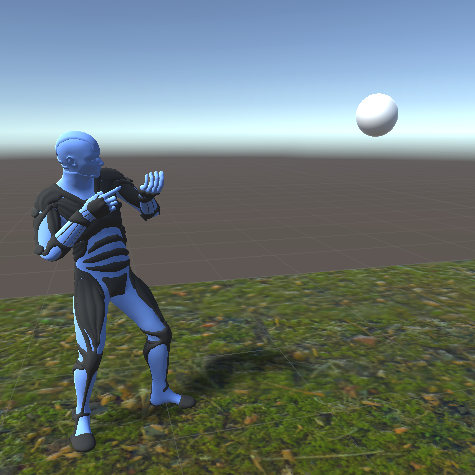
with adjustment added in you can see he aims much closer to where the target actually is. Below is the default without any kind of aim adjustment:

If he was holding a rifle he’d be aiming slightly above the sphere. If there’s another issue let me know, but that’s all I noticed.