Are you sure? The video references are already in the folder.
[blender_anim-workflow-body-mechanics_source-files > pre > video-ref]
But you should be able to draw in the VSE exactly the same way as any of the other editors. (press D and then draw)
To rotate your reference in the VSE, look at these buttons. (X flip and Y flip)
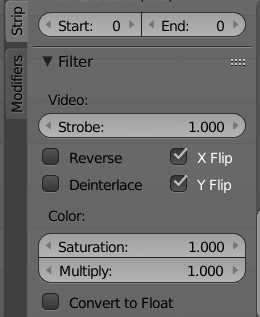
If you want to use your own ref in the movie clip editor, export it from the VSE into its own video first by pressing the “Animation” render button. If you have the video sequencer activated in the settings it will render out the corrected video.
Then import it again.

