I don’t know exactly what your problem is, but it almost looks as if some normals are not correct in the pictures. Turn on Face Orientation once and check and if some areas appear red then in edit mode -> Shift + N. Then the bevel will be able to work properly again.
Here is the “Face Orientation”- Function
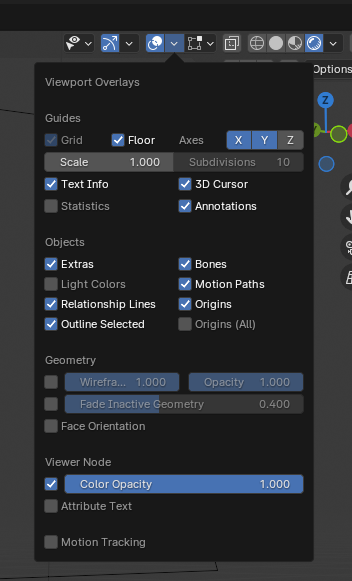
To the Bevel:
I can only answer with the little i know but what i do know is that the more geometry or support edges you add, the more the “base edges” become sharper or in round dense shapes, the vertex can overlap very quickly with a bevel.
The higher the bevel value the more support-edges you get. That would explain the behavior for me when you write that if you lower the bevel value that the behavior is then “better”
Go to your object -> right on object properties (orange symbol) -> viewport display and then check wireframe.
Then you will see your current mesh with your bevel modifier. if you now set your bevel higher again, you can observe the behavior.
If the vertex/edges then overlap, there are a problem.

