
The mystery of Rigify
Forum Archive › The mystery of Rigify
- This topic has 9 replies, 7 voices, and was last updated 5 years, 5 months ago by
twosef.
-
AuthorPosts
-
February 21, 2018 at 1:43 pm #9494
Hi there!
I’ve been trying to apply Rigify to my model.
When I Set parent with automatic weights this alert appeared: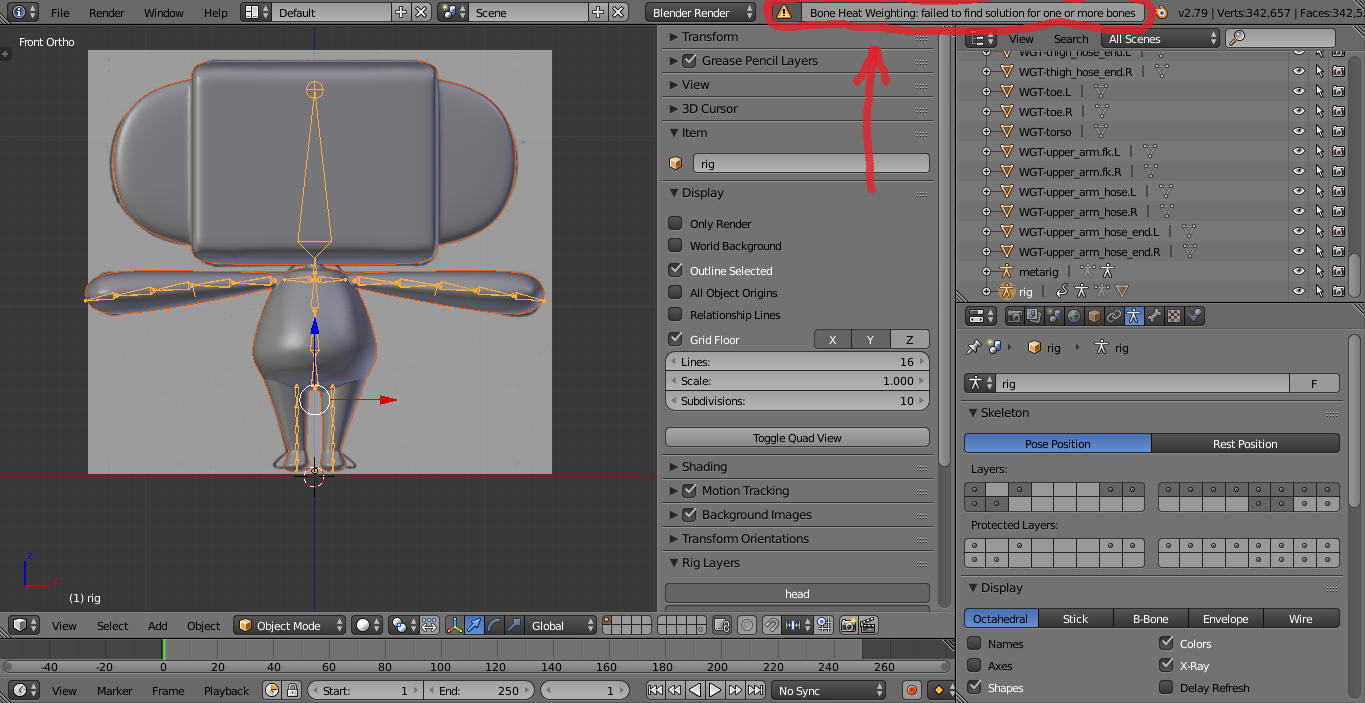
If it’s hard to see, it says: “Bone Heat Weighting: failed to find solution for one or more bones.”
What doues it mean and how can I fix it?Thank you in advance!
LA.
February 21, 2018 at 5:42 pm #34217perhaps @danpro can help with this? he tends to understand about bone heat weight and such things…
February 22, 2018 at 2:17 am #34218had this a couple times, as far as i’m aware it means it can’t assign a bone to a mesh area. typically, this might be due to something such as you placing a bone [or part of it] outside the mesh when positioning it, or not applying a Mirror mod, so that one sideof your mesh doesn’t actually exist for the Bone to reference.
February 22, 2018 at 7:50 pm #34219Bone Heat Failed To Find Solution errors can happen with any armature. It’s not caused by or exclusive to Rigify. The error is caused most often by errors in the mesh.
A few reasons for the error:
1. Overlapping geometry. The bone heat algorithm cannot “see” the mesh behind the folded geometry and throws the error.
Fix: Check the mesh for errors. Remove Doubles. Fix intersecting geometry. Or assign weights manually.
2. Flipped normals. Bone heat works from the inside out. If the faces of the mesh are not facing outward, they are blocking the bone heat.
Fix: Recalculate Normals. Or assign weights manually.
3. Unapplied scale on the mesh (scale is not 1,1,1) or differences in scale between the mesh and the armature can cause weighting issues.
Fix: Apply the transforms of the mesh before parenting to the armature. Ideally. the mesh and the armature should have the same origin and the origin should be at the world center.
One method to find the problem area is to separate the mesh by loose parts. (Select the mesh in Edit Mode, Select all vertices (Hotkey A), Hotkey P, Loose parts.) After the mesh has been separated, try parenting each mesh to the armature with Automatic Weights. If all parts successfully auto weight correctly, rejoin the separate meshes into a single mesh again.
I hope that helps.
Good luck!
January 22, 2021 at 2:40 pm #34220Hi, I’m having this same problem. I’ve done everything in the list posted by danpro to try to fix it, but with no success. I’m still getting the alert, and the rig won’t attach to the mesh. Is there anything else that might be causing this? Thanks!
January 22, 2021 at 9:49 pm #34221I assume that what you are showing above is your metarig and in that case I’m not surprised.
The thing to understand about rigify is that you have to follow the recipe. adding an extra set of arms is ok, but adding additional joints to limbs is going to confuse the algorithm that expects the two boned arm.
I just tried to see if deleting both the chest and pelvis bones would result in your error and No. it appears you dont need those bones to generate a rig.
The major problem you added to or subdivided the superlimbs which would scare the compiler, I mean the human form does not have three elbows. If you want bendy arms just change the type to tentacle in pose mode . Or youknow just use the normal arms and abuse the hell out to the tweak bones to get the rubberhose arm effect.
January 23, 2021 at 12:05 pm #34222Hi, no, sorry, the image above isn’t mine. I didn’t attach one. I’m having a problem parenting my rig to my mesh using armature deform with automatic weights. It doesn’t work, and I get the error: “Bone Heat Weighting: failed to find solution for one or more bones.” I’ve followed the suggestions by danpro, and none of them work, so I’m wondering if there are other things that might cause this.
January 26, 2021 at 1:15 pm #34223Ah, never mind, I figured it out. I was trying to separate loose parts by selecting the mesh in vertex mode, but of course, it needs to be in face mode! So I did that, and now it works. Wanted to put this here in case anyone else overlooks this.
March 28, 2021 at 5:19 pm #34224Another update, because I was still having problems with this, even with all Danpro’s suggestions tried. I found a solution that worked for me, so I wanted to put it here. Apparently Blender runs into problems parenting with automatic weights if the mesh is too dense, that is, in areas where the number of polys increases. I was having particular problems with toenails, for instance. The solution is to increase the size of both the rig and the mesh (I scaled by 10x, because it was an easy number to remember), apply the transforms on both, and then again try to parent with automatic weights. You can then scale back to normal size once you’re finished.
March 28, 2021 at 11:25 pm #34225hfs this worked. its so dumb, but makes sense at the same time.
i had spent 3 days fixing up a pretty high poly model and it parented fine. that was couple weeks back.
but removed parenting cuz it messed up all the hair particles.
then i rescaled it later ( which i totally forgot about ). and now when i tried to parent the same mesh with same armature the “heat weighting failed” showd up again. can’t put my frustration into words.
u r a lifesaver bruv. thnx a lot.
-
AuthorPosts


- The topic ‘The mystery of Rigify’ is closed to new replies.