
How to create a center pivot point for mutiple mesh files?

Forum Archive How to create a center pivot point for mutiple mesh files?

Viewing 2 posts - 1 through 2 (of 2 total)
  • Author
    Posts
  • #9189
    Lennart Holterman
    Participant

      Hello there,

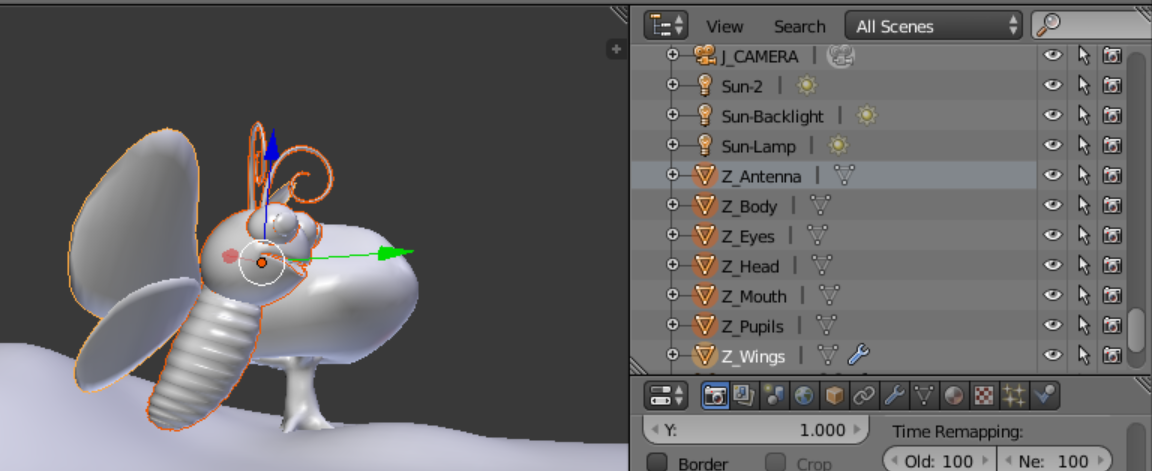
      I have a Butterfly which exists out of 7 different mesh files. How can i create one centered pivot point

      for this file. So that when i import it into my Compositing software (fusion9) the butterfly has a centered pivot point?

      Cause at the moment when i export the .abc file out of Blender –> and i import it into Fusion the pivot point is way of.

      So my questions is:

      How can i select all the meshes –> and create a pivot point for the whole butterfly?

      Thanx in front

      Greetz Lenny

      #31519
      Matthew Fricker
      Participant

        Try setting the 3d cursor to the point where you want the pivot to be, and then select each mesh in OBJECT mode , one by one , and with it selected , hit CTRL,SHIFT,ALT,C and a menu will popup, choose “origin to 3D cursor” . Do that for every mesh and they will all have their origins set to the exact same point 🙂 

        Hope that is what you are looking for. 

      Viewing 2 posts - 1 through 2 (of 2 total)
      • The topic ‘How to create a center pivot point for mutiple mesh files?’ is closed to new replies.