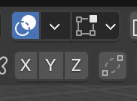
Since there is no screenshot lets begin with the basic. Make sure you are using 4.1 or newer, that you have a mesh selected, and that you’re in edit mode. The mesh edit overlays is the square icon with vertices in each corner on the header. It is next to the overlay icon which is a circle with a filled circle offset and on top of the circle.