
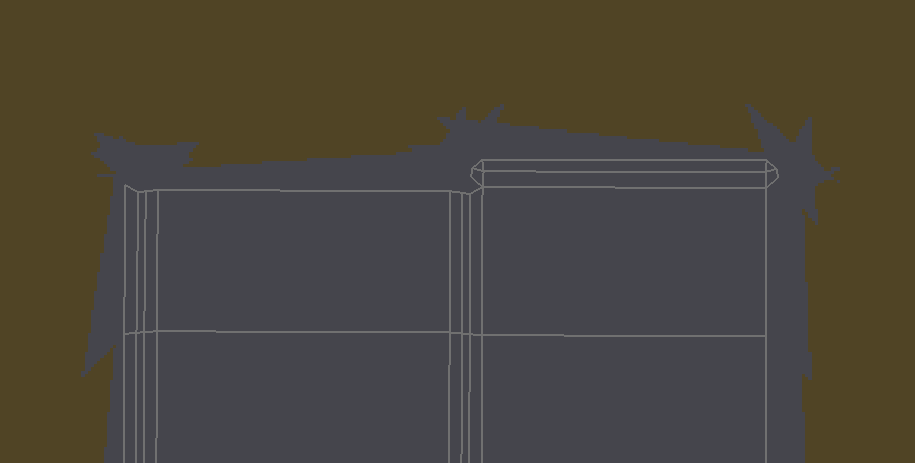
When I increase the bleed it becomes uneven. I increased it with the side panel because I did not have the same options you had.

Forum Archive When I increase the bleed it becomes uneven. I increased it with the side panel because I did not have the same options you had.

Viewing 5 posts - 1 through 5 (of 5 total)
  • Author
    Posts
  • #8826
    lukesinclair
    Participant

      #29426
      Kent Trammell
      Participant

        I’ve not experienced this issue myself. Can’t think of what could cause this…If you can get me your .blend file (via Dropbox link or similar file hosting service) I will take a look into the issue.

        #29427
        Kent Trammell
        Participant

          Thanks for uploading your file for me to take a look at. But now I’m really stumped. Here’s what the fill brush does for me with bleed set to 10 pixels with your file:

          Can you try again and see if the problem is still occurring?

          Also are you using the official 2.80 build of Blender?

          #29428
          lukesinclair
          Participant

            I just reinstalled blender and it didn’t work. What would you recommend I do next?

            #29429
            Kent Trammell
            Participant

              As long as the spikes of grey don’t overlap into other UV islands, it shouldn’t be a problem. Definitely annoying that the issue is happening and not reproducible on my end, but you should be able to continue on. Again, just make sure the spikes don’t overlap into other UV islands. If they do, try a bleed value of 5 rather than 10.

            Viewing 5 posts - 1 through 5 (of 5 total)
            • The topic ‘When I increase the bleed it becomes uneven. I increased it with the side panel because I did not have the same options you had.’ is closed to new replies.