How to use X-Ray mode in 2.8?

Forum Archive How to use X-Ray mode in 2.8?

Viewing 3 posts - 1 through 3 (of 3 total)
  • Author
    Posts
  • #8400
    anthonyt
    Participant

      I enabled Hidden Wire under the shading overlays tab, however I could not find X-Ray as a checkmark in the viewport display dropdown of the Object properties tab. I found it in the Shading options tab. However it just bypasses the hidden wire function and I see the whole wireframe as transparent. Is there a solution for this in 2.8?

      #28676
      storm1822
      Participant

        Top right of the 3d view screen, inbetween Overlays and Shading options – You’re looking for the button here which is 2 Squares.

        #28677
        Derek Brouwer
        Participant

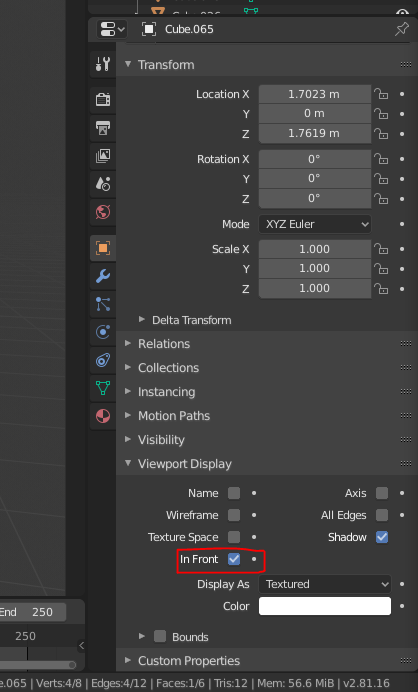
          To anyone else who is wondering, the setting is called “In Front” and it can be found in the “properties” panel > “object properties” > “Viewport display”.

        Viewing 3 posts - 1 through 3 (of 3 total)
        • The topic ‘How to use X-Ray mode in 2.8?’ is closed to new replies.