How to map it onto a sphere?

Forum Archive How to map it onto a sphere?

Viewing 4 posts - 1 through 4 (of 4 total)
  • Author
    Posts
  • #8382
    Daniel Lapalme
    Participant

      This works on a place, but how do I get it on a sphere like in the thumnails? 

      #28646
      Thibaut Bourbon
      Participant

        Great follow-up question @bobotheimp  !

        On the screenshot below you can see how to do it. First you have to UV-unwrap the sphere, that way all the faces will be “laid down” on a 2d plane, and the maths nodes will then apply the same way.

        The second thing to do is to change the Texture Coordinate from “Object” to “UV”, so Blender understands what to use. You’ll probably have to crank up the X,Y and Z scale of the mapping node, depending on the size of the sphere.

        Note that UV-unwrapping a sphere can be sometime challenging, and it’s normal (and unavoidable) to have the tiles twisted on some areas (like the poles of the sphere).
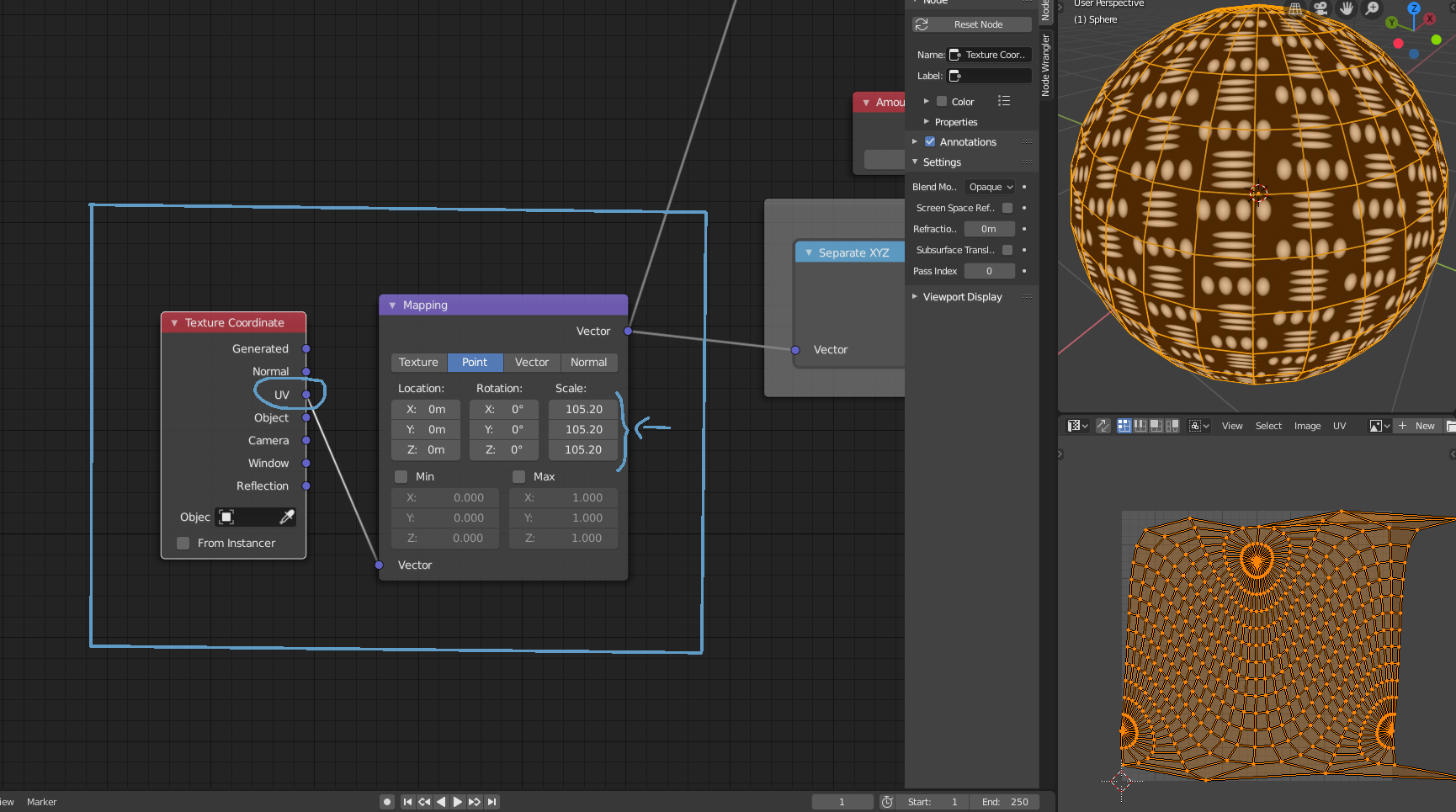
        Hope this helps, let me know if it worked!

        /Thibaut

        #28647
        Laslo Scotton
        Participant

          A little “trick” , if you dont mind about more vertecies in your scene just subsurface modifier a cube on 1 or two.

          #28648
          Thibaut Bourbon
          Participant

            Indeed,  and then in Edit mode selet all and hit Shift+S ”to sphere” with maximum value (1). The unwrapping can still be fonky and the texture warped but I Find it easier to control, good call!

          Viewing 4 posts - 1 through 4 (of 4 total)
          • The topic ‘How to map it onto a sphere?’ is closed to new replies.