
Any guidance on what to look for when im getting strange green overexposure looking areas in composite?

Forum Archive Any guidance on what to look for when im getting strange green overexposure looking areas in composite?

Viewing 7 posts - 1 through 7 (of 7 total)
  • Author
    Posts
  • #8323
    Darren McBain
    Participant

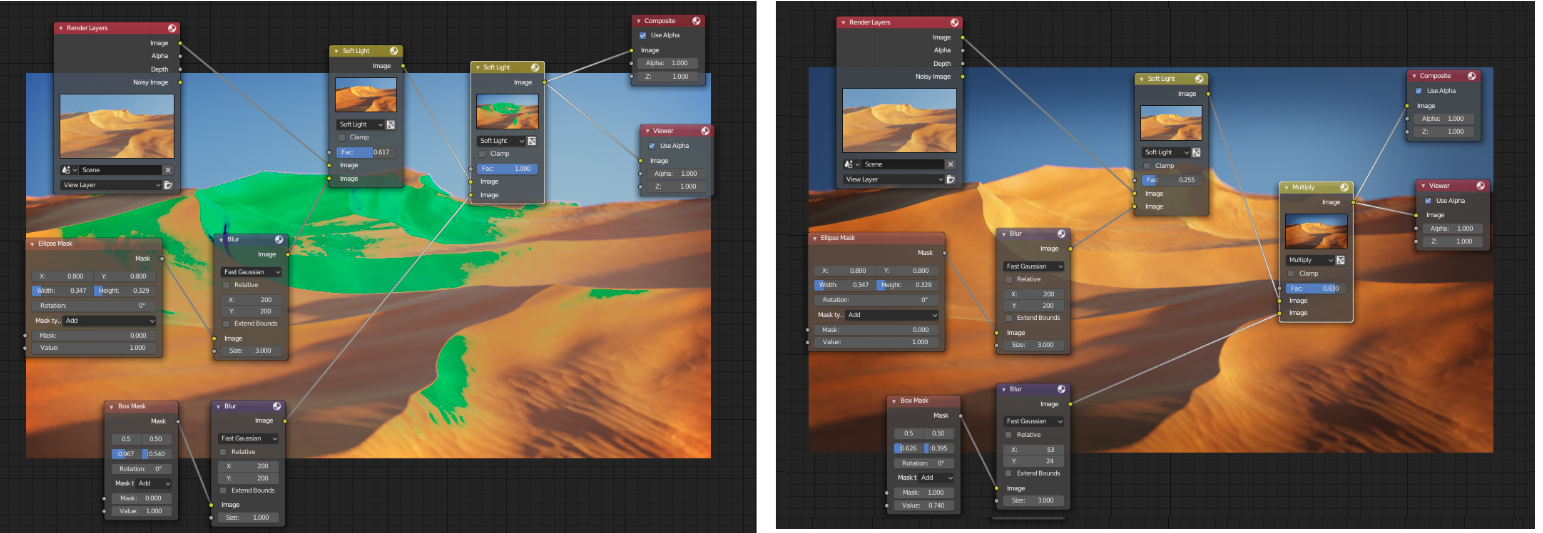
      Sorry for asking, but i cant see where im going wrong, getting some strange coloration in the composition. ive shown my nodes on the left as im following, and the image previews on the nodes since it just seems to be when i apply the box matte blur.  ive kind of worked around it to get an effect i like, as per the image on the right.  

      just thought id ask in case im doing something daft and cant see it 🙂 

      any advice would be greatly appreciated.

      #28526
      Kent Trammell
      Participant

        What in the world…. can you provide a download link to your .blend so I can take a look? Wondering if it’s a 2.8 issue.

        #28527
        Darren McBain
        Participant

          Cheers Kent, heres a google drive link for the Blend file, just have to re-add the HDRI image in.
          https://bit.ly/2Y9fjK4
          ill download the latest build to check.

          might be driver related, or just me missing something simple, does seem to be in the brighter areas in the centre.

          #28528
          aimerqua
          Participant

            I have almost the same problem.

            Artifacts appear when the brightness is less than -0.42.

            And Blender crash 1 time of 2.

            #28529
            Kent Trammell
            Participant

              @oboshape @aimerqua I solved the green by enabling the Clamp checkbox on the first soft light mix node.

              So from that I think the soft light mixes are generating values over 1 and when they’re layered on each other, our monitors error out with how to display those values. Interesting.

              #28530
              Darren McBain
              Participant

                Cheers for digging into that Kent and getting back to me, much appreciated.  ill have to watch that going forward.  

                sounds like an overexposure of sorts if they’re coupled together when its blending the white part of the mask and oversaturating the input image, another one to add to the toolbelt of gotchas 😉

                tried to read the HarkyMan blog, think he put it together back in 2008, but went waaay over my head, heh.

                http://www.harkyman.com/2008/08/21/new-compositor-mix-types/ 

                #28531
                Kent Trammell
                Participant

                  Wow that is way back there! Interesting read. Overexposure is a good comparison afaik. Indeed another ‘gotcha’ for our toolbet lol.

                Viewing 7 posts - 1 through 7 (of 7 total)
                • The topic ‘Any guidance on what to look for when im getting strange green overexposure looking areas in composite?’ is closed to new replies.