I’d recommend updating to 4.0.2. You are on 4.0.1. There were a lot of rendering bug and other issues.
1. Yes, make sure local camera isn’t checked.
2. Also in properties editor->scene tab->Scene panel->make sure your camera is set in the field box to the right of where it says camera.
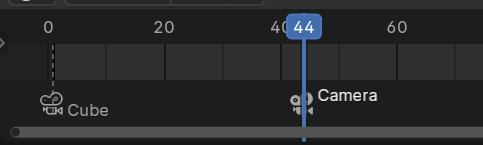
3. Make your timeline editor larger and make sure you don’t have a camera bind.(It will have a camera icon with the name of bound camera/object. This is easy to create by selecting something(Usually a camera) and with mouse cursor over the timeline editor pressing ctrl+b. Say you where trying to bevel an edge in edit mode and your mouse cursor slides down out of the 3D viewport into the timeline editor BOOM you have a camera bind.