
Snapping using edge / closest not aligning to edge of object I’m moving. . .

Forum Archive Snapping using edge / closest not aligning to edge of object I’m moving. . .

Viewing 4 posts - 1 through 4 (of 4 total)
  • Author
    Posts
  • #7134
    Austin Dunham
    Participant

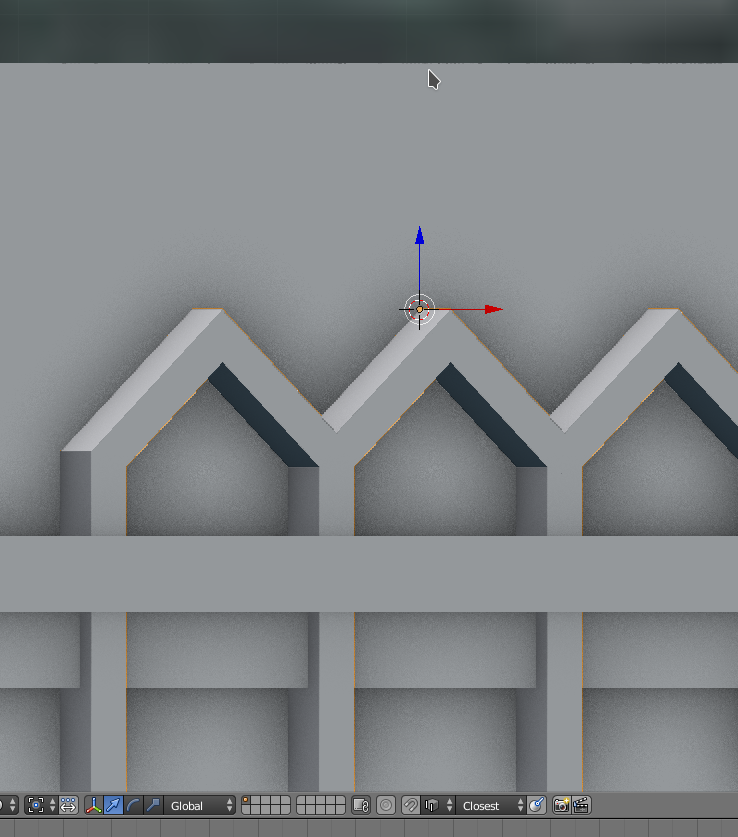
      I’m trying to get the points of the “arches” to align with the top edge near where my cursor is.

      I’m using closest and edge.

      I get the orange circle indicating I have the edge select on the background object – difficult to capture in a screen shot – but instead of the points jumping to that edge, they’re dropping down as you can see in the screen shot.

      I’m sure I’m missing something, I’m just not sure what.  It’s driving me a bit batty.

      #26571
      Jonathan Lampel
      Participant

        Hmm, that is a bit weird. Could you do it in edit mode instead? I’ve found snapping to be more predictable when it’s working with selected vertices instead of the whole object. 

        #26572
        Austin Dunham
        Participant

          Thank you Jonathan.
          Not sure if I did what you suggested, deleted and recreated the object, or what, but I got it working.
          I’m going to upload the Sentinel Building WIP which has all the arches where they’re supposed to be.

          #26573
          Austin Dunham
          Participant

            Sentinel Building if you’re curious what the triangular arches were for.

            Thanks again for your help.

          Viewing 4 posts - 1 through 4 (of 4 total)
          • The topic ‘Snapping using edge / closest not aligning to edge of object I’m moving. . .’ is closed to new replies.