
Reply To: Collab2021 – WIP – zackwhy
Forum Archive › Collab2021 – WIP – zackwhy › Reply To: Collab2021 – WIP – zackwhy

Nice job @zackwhy! You really went for it and the result is very promising 👍
All the right components are there but some could be refinement in their application:
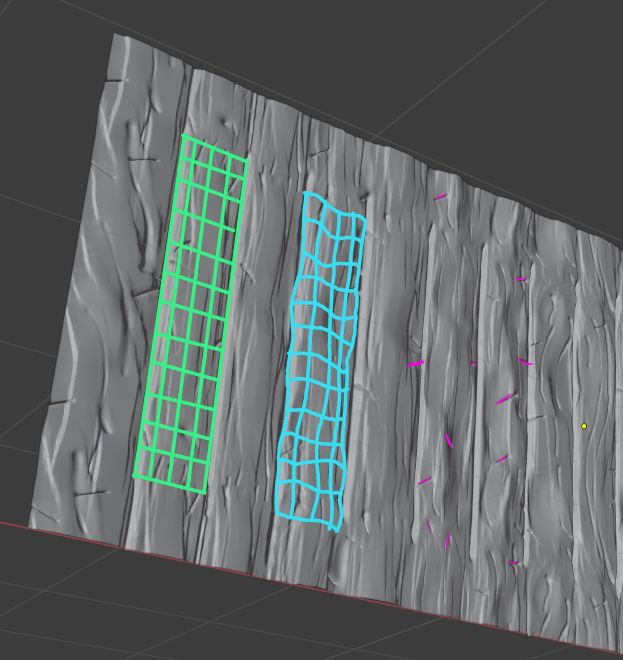
With the green wireframe I want to illustrate that the boards should maintain a mostly planar face. Despite being rough up with crevices, wood grain, scratches, etc it ultimately maintains a flat surface.
On the contrary your surface (cyan wireframe) has wobbled the surface so much that it’s lost the planar surface and starts too look less like planks of wood. Diminishing the surface wobble intensity would be a notable improvement.
Lastly the little horizontal scratch marks (magenta) feel more like staple marks or something. I think this is due to a uniform depth to your stroke. Instead the center of each mark should be deeper than the ends. The effect tends to fade at the ends
I hate suggesting a redo but I’m afraid that’s probably the best approach…Unless Blender gets sculpting layers that can be turned off or lessened non-destructively, it’s a better option to go at it fresh rather than trying to change what’s there 😕 Again though, you have all the right components! They just need a couple refinements.
Also could you copy + paste your sculpture into the WIP placeholder I made for you? SPICE-VENDORS-HOUSE/SCENES/MODELS/WIP/HOUSE/EXTERIOR/ WIP_house_wainscoting_zackwhy_00.blend. If you’re confused about that process, blanchsb made a great tutorial about it: https://youtu.be/EgYtk72tDsc