
Reply To: Why shouldn’t “Normal Maps” be in “Linear Color Space”?
Forum Archive › Why shouldn’t “Normal Maps” be in “Linear Color Space”? › Reply To: Why shouldn’t “Normal Maps” be in “Linear Color Space”?

@jlampel I’ve taken another look into the “Blender 2.90 Manual” concerning the “Color Management” here:
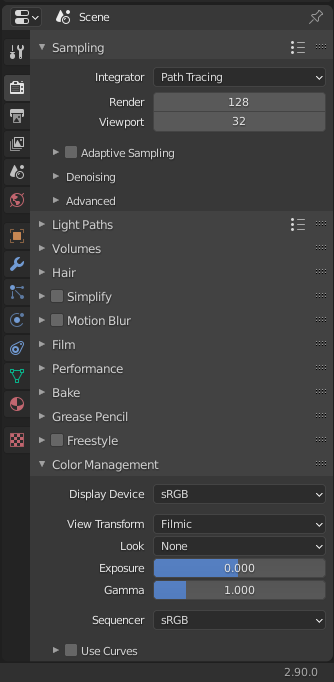
I think that the first setting in the “Color Management” panel only does a gamma correction for a certain device which is per default an sRGB display. Squeezing colors into a color space that would otherwise simply be clipped is part of the “View Transform” setting which is per default “Filmic” that doesn’t only convert colors into sRGB but also gives them a look as if they had been taken on a real film:
“There is also an artistic choice to be made. Partially that is because display devices cannot display the full spectrum of colors and only have limited brightness, so we can squeeze the colors to fit in the gamut of the device. Besides that, it can also be useful to give the renders a particular look, e.g. as if they have been printed on real camera film. The default Filmic transform does this.”

Conversion from linear to display device space.
If you don’t want any display gamma correction, set “Display Device” to “None. Unchecking the “Save as Render” option in the “Save as” dialogue only disables the transformations from “View Transform” down to “Gamma” in the “Color Management” panel. The “Gamma” setting in that same panel is an additional gamma conversion on top of the gamma correction for a certain device and is only done for artistic reasons:
” Gamma
Extra gamma correction applied after color space conversion. Note that the default display transforms already perform the appropriate conversion, so this mainly acts as an additional effect for artistic tweaks.”
I think, the term “Color Space Conversion” can be confusing because the question is what is part of that conversion: Does the conversion only mean a gamma correction or does it also mean that colors are shifted for making them visible on a certain device so that for example areas that would otherwise be overexposed show after that color shifting all the details in that part of your scene. Once again: The “Display Device” setting in the “Color Management” panel in my opinion only applies a gamma correction for sRGB devices per default and no color shifting as done under “View Transform” with the “Filmic” setting.
If you load an image texture with “sRGB” setting, I suppose it only an inverse gamma so that Blender can calculate with the original color value. The “Blender Manual” unfortunately doesn’t explicitely mention here what the color space conversion exactly does. If there should be a difference between “Non Color Data” and “Linear Space” then I would be happy to get an inside look on what is exactly happening. I suppose that “Non Color Data” is already in “Linear Space” what seems to be expressed in my opinion in this diagram from the “Color Management” chapter of the “Blender 2.90 Manual”:
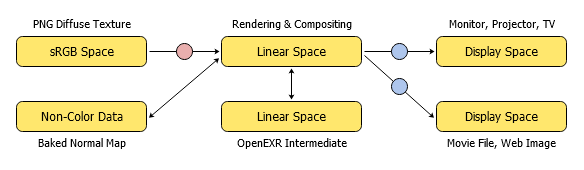
An example of a linear workflow.
The double arrow and the missing color circle between “Non-Color Data” and “Linear Space” seems to indicate that there is no conversion at all. Nevertheless, I’m wondering what’s the effect of the 4 different “Color Space” settings for “Image Textures” reaching in the dropdown menu from “Linear” to “Raw”
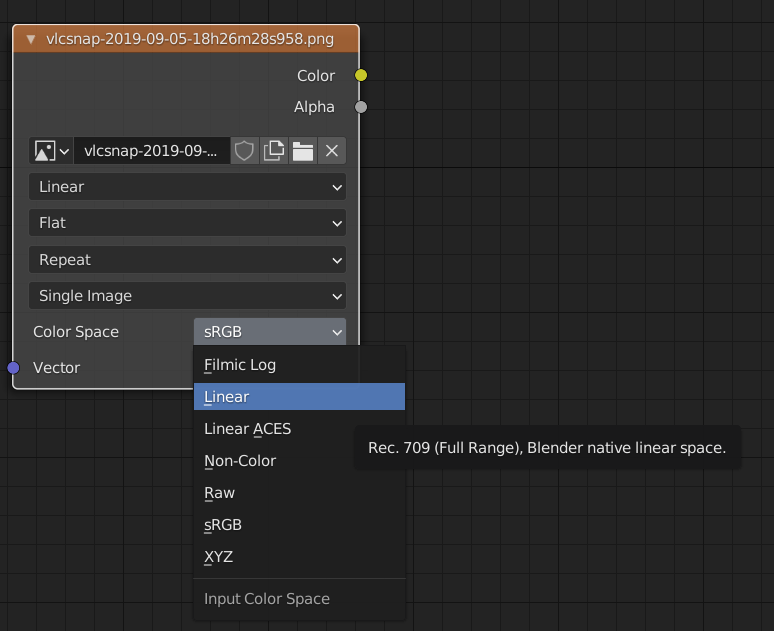
If there were someone familiar with Blender’s source who could give a precise explanation of what happens under the hood, that would help to remove the confusion.